

If your analytics show healthy website traffic but almost no form fills, calls, or booked consultations, you don’t have a traffic problem — you have a conversion problem. For most local service and B2B websites, the real blockers are slow pages, fuzzy messaging, weak calls-to-action, and a user experience that makes it hard to take the next step.
In this guide, you’ll see the most common reasons websites get traffic but no leads, plus a practical checklist to fix them. You’ll also learn when it’s time to stop patching an old site and invest in a conversion-focused redesign that acts like a real growth engine.
Striking Alchemy is a Pittsburgh-based web design and SEO studio that builds high-performing Framer websites for growing service and ecommerce brands. If you’re seeing "website traffic but no leads" in your analytics, the steps below are where to start.
Key Takeaways:
Bad experience kills conversions: Slow load times, poor mobile usability, and cluttered layouts send visitors back to search — even if your traffic is strong.
Weak or generic CTAs: Buttons like "Submit" or "Learn More" don’t tell visitors why they should act or what happens next.
Content that doesn’t match intent: If your copy doesn’t clearly answer who you are, what you do, and why it matters, visitors won’t become leads.
No visibility into behavior: Without analytics and behavior tracking, you’re guessing at what’s broken and which fixes will move the needle.
Quick solutions overview:
Audit your site: Use tools like Google PageSpeed Insights or Hotjar, or Microsoft Clarity to find speed, UX, and scroll-depth problems.
Clarify your message: Make sure visitors can answer "Who is this for? What do they do? What’s my next step?" within a few seconds of landing.
Improve CTAs and forms: Use benefit-driven, low-friction calls-to-action and trim your forms down to the essentials.
Add lead magnets: Offer guides, templates, or checklists that match your best-fit buyers and capture email early in the journey.
Track, test, and iterate: Set up GA4 events, funnels, and heatmaps so you can see exactly where visitors drop off and what to fix next.
If your website isn’t converting, it’s time to make targeted changes. A faster site, clear messaging, and actionable CTAs can turn traffic into leads.
Why Your Website Isn't Converting Visitors Into Leads
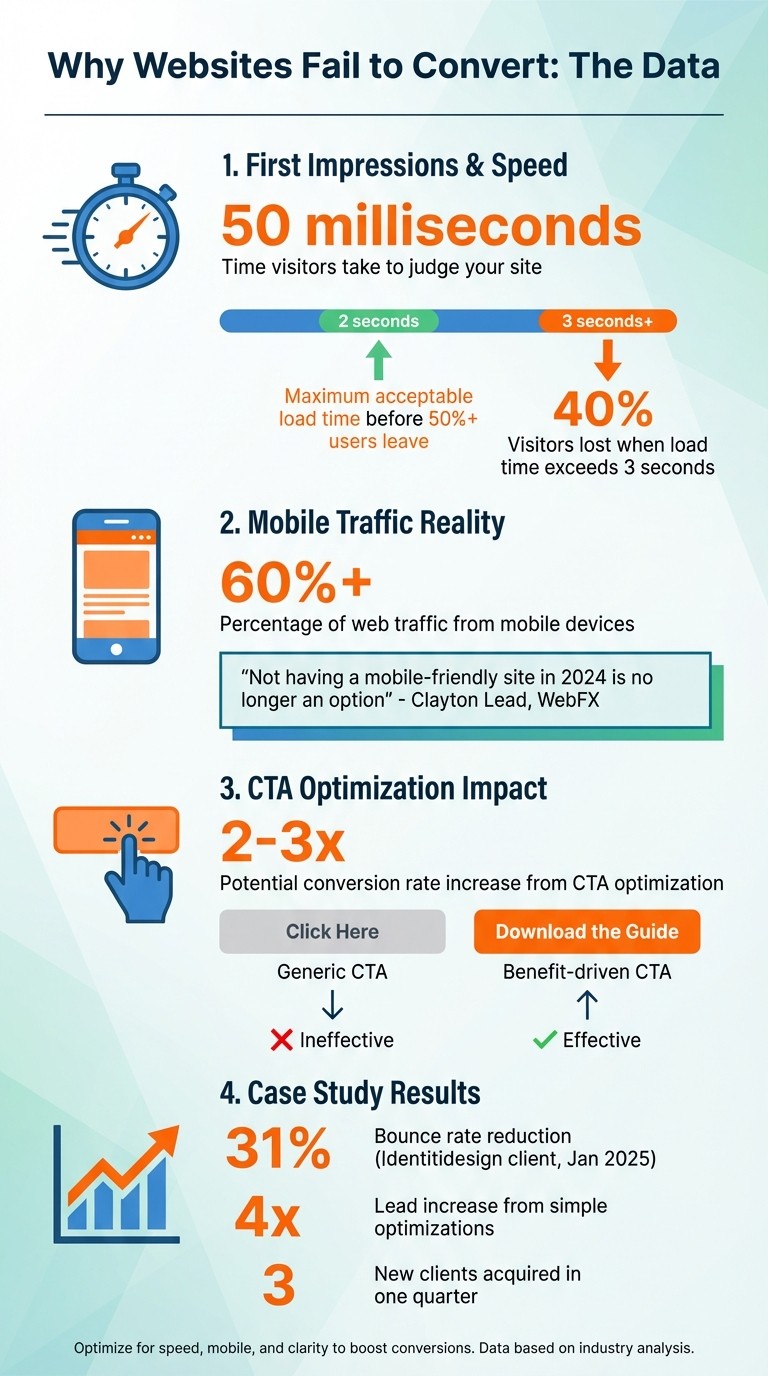
Website Conversion Statistics: Load Times, Mobile Traffic & User Behavior Data
If your website is pulling in traffic but failing to generate leads, it’s not just bad luck — there’s usually a clear reason why. Four main culprits often stand out: poor design and user experience, weak calls-to-action (CTAs), unaligned content, and the absence of visitor tracking.
Bad website design and user experience
First impressions are made in just 50 milliseconds. If your website is cluttered, slow, or hard to navigate, people won’t stick around long enough to become leads. On mobile devices — which now account for the majority of web traffic — the stakes are even higher. More than half of users will leave if a page takes longer than 2 seconds to load, and trust drops quickly with every extra second.
Mobile usability is another common stumbling block. Broken layouts, tiny tap targets, and forms that require constant zooming frustrate visitors. Beyond speed and usability, cluttered layouts and confusing navigation cause decision fatigue and make it harder for someone to find your contact form, booking link, or lead magnet.
Weak or missing calls-to-action
Even with a solid design, poor CTAs can halt conversions. Generic phrases like "Click Here", "Submit", or "Learn More" don’t tell visitors what they’ll get or why it matters. CTAs buried at the bottom of the page, or a dozen competing buttons with equal visual weight, only add to the confusion.
A smarter approach is to use one primary CTA per page (for example, "Get My Free Website Audit") supported by a lower-commitment option (like "Download the Conversion Checklist") for visitors who aren’t ready to talk to sales yet.
Content that doesn’t connect with visitors
Visitors arrive on your site with three core questions in mind: Who are you? What do you do? Why should I care? If your hero section doesn’t answer those clearly, they’ll bounce back to search and find a competitor who does.
Common issues include vague positioning ("innovative solutions"), feature-heavy copy that never translates benefits, and walls of text with no visual hierarchy. Without trust-building elements like testimonials, case studies, and proof of results, even strong offers can fall flat.
No way to track visitor behavior
If you’re not tracking how visitors interact with your website, you’re flying blind. Tools like Google Analytics 4, Hotjar, or Microsoft Clarity can reveal where people click, how far they scroll, and where they drop off in your funnel.
High traffic but no leads often shows up as a pattern of users landing, scrolling a bit, then exiting on your homepage or service pages. Without instrumentation — events, goals, and funnels — it’s hard to know whether the issue is with your traffic quality, your messaging, or your UX.
How to fix your website and turn traffic into leads
You don’t always need a full rebuild to improve conversions. In many cases, a structured set of focused improvements can turn "website traffic but no leads" into a steady pipeline of inquiries.
1. Run a Website Audit and Fix What's Broken
Start by pinpointing the problem areas. Tools like Google PageSpeed Insights, GTmetrix, and Lighthouse can uncover technical issues like slow loading times or poor mobile responsiveness [8][3][10]. To go deeper, use behavioral tools such as Hotjar or Crazy Egg to see where visitors lose interest, ignore buttons, or stop scrolling [8][5][6].
Focus on the pages that matter most for lead generation first — typically your homepage, top service pages, and key landing pages.
Turn “traffic but no leads” into a website that sells
If you’d rather not untangle everything alone, you can:
See how our growth-focused web design process works for service and ecommerce brands at /web-design.
Explore our Framer Studio at /framer-studio for fast, low-maintenance sites built to convert.
Most projects start with a short website audit and roadmap so you know exactly which fixes will move the needle first.
2. Decide whether it’s time to migrate to Framer
Older platforms like WordPress, Wix, and Squarespace often come with heavy plugins, frequent updates, and clunky mobile experiences that cap your conversion potential. Framer is a modern alternative designed for speed and simplicity, with zero maintenance required.
Framer takes care of technical essentials like image resizing, WebP conversion, and font optimization, ensuring fast load times. Built-in tools like A/B testing, analytics, and heatmaps help you track user behavior and refine your site’s performance. Its CMS makes content updates — like adding case studies or blog posts — simple and low-friction.
Striking Alchemy specializes in migrating sites from WordPress, Squarespace, and Wix to Framer so local service and ecommerce brands can ship high-performing, beautifully designed pages without ongoing maintenance headaches.
Feature | Outdated Platforms (WordPress/Wix) | Framer (via Striking Alchemy) |
|---|---|---|
Load Speed | Slowed by heavy plugins/scripts | Optimized for fast performance |
Maintenance | Requires frequent updates | No maintenance needed |
User Experience | May struggle on mobile | Fully responsive, mobile-first design |
Conversion Potential | Limited by technical debt | Built for smooth, modern interactions |
3. Add lead magnets and improve your CTAs
Even the best-designed website won’t convert without a compelling next step. Lead magnets — like free guides, templates, quizzes, or calculators — give visitors a low-risk reason to share their email address while signaling buying intent.
Pair each lead magnet with a specific, benefit-focused CTA. Replace "Submit" with options like "Get My Free Audit", "Download the Checklist", or "See My Conversion Score". Put your primary CTA above the fold and repeat it at logical points through the page.
4. Set up automated follow-ups and track results
Leads don’t mean much if they sit in an inbox. Use a CRM and simple automation to ensure every form fill or guide download triggers a timely follow-up. For awareness-stage visitors, a short educational email sequence works well; for high-intent actions (like "Request a Quote"), you’ll want a faster, more personal response.
In GA4, configure events for form submissions, clicks on key CTAs, and booked calls. Build funnels to see where visitors drop out. Combined with heatmaps and session recordings, this data will tell you whether your "traffic but no leads" issue is driven by UX, messaging, or traffic quality.
Website conversion checklist
Use this checklist as a quick way to spot issues that might be keeping your website from turning traffic into qualified leads:
Speed: Key pages load in under 2–3 seconds on mobile.
Clarity: Within 5–8 seconds, a new visitor can tell who you serve, what you do, and what to do next.
Primary CTA: There is one clear primary CTA above the fold on each lead-generating page.
Forms: Forms ask only for essential fields and are easy to complete on mobile.
Proof: Testimonials, case studies, and proof points are visible near CTAs.
Lead magnets: You offer at least one low-friction resource (guide, checklist, quiz, etc.) for earlier-stage visitors.
Tracking: GA4 events, funnels, and at least one behavior tool (Hotjar/Clarity) are in place.
FAQs
How do I know if my traffic is the wrong audience?
If your website visitors aren’t completing key actions — like filling out forms or booking calls — and your bounce rate is high even on well-designed pages, you may be attracting the wrong audience or ranking for the wrong queries. Review your top queries in Google Search Console and make sure they match your ideal customer profile and offers.
What’s the best lead magnet for my business?
The best lead magnet solves a specific problem your best-fit buyer has early in the journey. For B2B and service brands, downloadable guides, templates, or checklists work well. For ecommerce, discounts, quizzes, or product finders are often more effective. Start simple, then iterate based on sign-up and conversion data.
Which pages should I optimize first for leads?
Start with the pages that get the most traffic and are closest to conversion: your homepage, top service pages, and any landing pages you drive paid traffic to. Improving conversion on those a few percentage points usually beats chasing more traffic elsewhere.
When is it time for a full redesign vs. just optimizing what I have?
If your platform is slow, hard to update, or held together by plugins and one-off hacks — and you’re constantly fighting it just to make small changes — it’s often more cost-effective long term to move to a modern, conversion-focused platform like Framer. If your foundation is solid but the UX and messaging need work, start with focused optimization instead.
If you’re staring at "website traffic but no leads" in your reports and want a clearer path forward, start with a quick website audit and roadmap from Striking Alchemy’s web design & SEO team.