
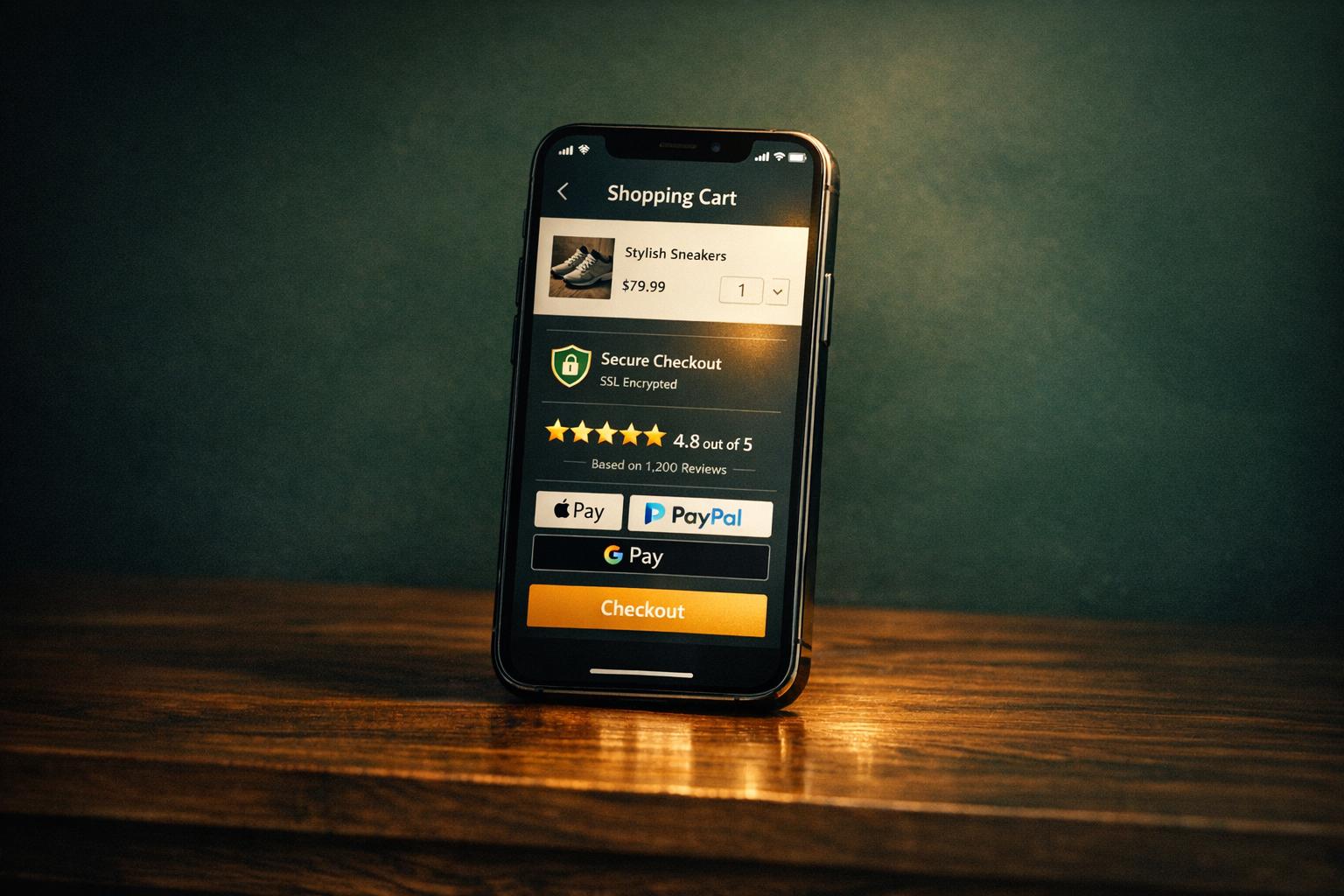
Mobile shopping is convenient, but trust issues hold it back. Here's the problem: most users hesitate to complete purchases due to security concerns, unclear policies, and poor mobile design. With 70% of carts abandoned and 19% of shoppers citing distrust in payment processes, the stakes are high.
The solution? Clear trust signals. These include:
Displaying security badges and SSL encryption.
Highlighting customer reviews and transparent policies.
Simplifying mobile checkout with fast load times and easy payment options like Apple Pay.
When trust is built, mobile shoppers spend more and convert faster. This article breaks down the most effective ways to establish trust and improve mobile ecommerce performance.
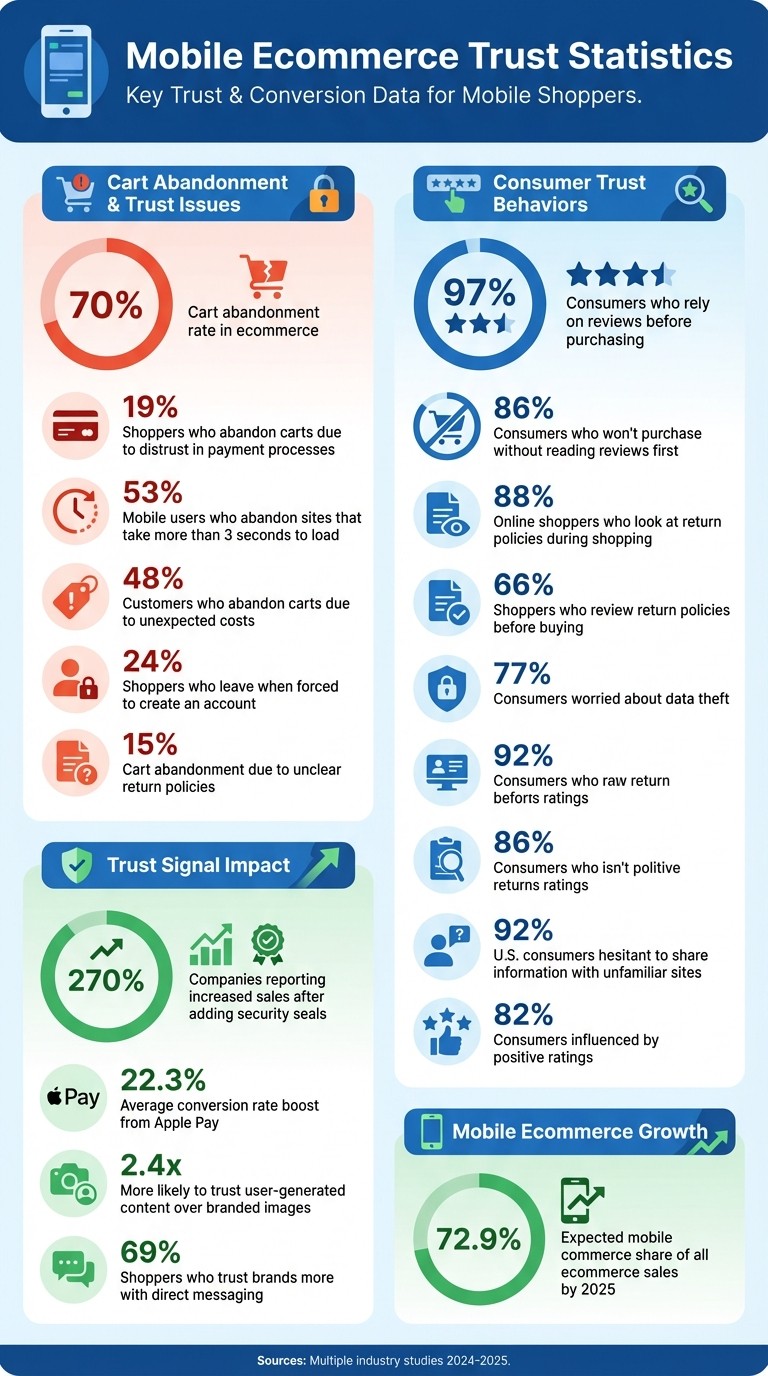
Mobile Ecommerce Trust Statistics: Cart Abandonment and Consumer Behavior Data
Trust Problems in Mobile Ecommerce
Understanding the hurdles that mobile shoppers face is key to addressing trust issues effectively. These barriers often lead to cart abandonment, and identifying them can help businesses implement trust signals that resonate with mobile users. Here are five major trust challenges in mobile ecommerce:
Security Concerns
Mobile users are particularly vulnerable to security threats like phishing attacks and e-skimming. Phishing tricks users into revealing sensitive information through deceptive messages, while e-skimming allows hackers to steal credit card details in real time during checkout [1]. If these risks aren’t clearly addressed, shoppers may feel their financial data is unsafe. To counter this, businesses need to display strong, visible security measures that reassure customers.
Missing Social Proof
When a product lacks reviews or ratings, shoppers often hesitate to buy. This is a major factor behind checkout abandonment. In fact, 86% of consumers won’t make a purchase without first reading reviews, and products with as few as five reviews are 270% more likely to sell [4]. On mobile devices, where the in-store experience of examining a product isn’t possible, social proof becomes even more critical. Reviews and ratings act as a digital equivalent, helping build confidence in the purchase.
Lack of Transparency
Unclear pricing and vague policies can make customers feel misled. This lack of transparency is a significant contributor to the roughly 70% cart abandonment rate seen in ecommerce [4][5]. When shoppers don’t know exactly what they’re paying for or the terms of their purchase, trust erodes quickly.
Poor Mobile Design
A website’s design can make or break trust within seconds. Outdated layouts, grainy images, and cluttered interfaces often signal unprofessionalism, leaving users doubtful about a site’s legitimacy. In a study of 138 major mobile ecommerce sites, none were rated as having a "good" overall user experience, and 62% were deemed "mediocre" or worse [9]. A poorly designed mobile site can make shoppers question whether the business is reliable enough to handle their transactions securely.
Checkout Friction
Complicated checkout processes are a major roadblock for mobile shoppers. Issues like requiring account creation, limited payment options, or buttons that are hard to tap can frustrate users. Combine this with slow page loading times - 53% of mobile users abandon a site if it takes more than 3 seconds to load [6][5] - and it’s easy to see why many customers give up before completing their purchase. Reducing these pain points is crucial to building trust and encouraging conversions on mobile platforms.
Security and Privacy Trust Signals for Mobile
Mobile shoppers often hesitate at checkout due to concerns about security. With 19% of users abandoning their carts because they don't trust a site with their credit card information [8][10], and 77% worrying about data theft [8], it's crucial to provide visible proof that your mobile site is secure. Let’s dive into how you can use specific visual cues to build trust and ease these fears.
Display Security Features
To address security concerns, integrate clear and recognizable trust signals into your mobile site.
Use SSL/HTTPS encryption. Modern browsers flag sites without HTTPS as "Not Secure", which can immediately erode trust. Beyond the technical setup, ensure this encryption is visibly communicated to users [10].
Show trusted security badges. Display seals from well-known providers like Norton, McAfee, or TrustedSite near checkout. These badges work because customers recognize and trust these brands. For instance, 66% of companies that added third-party assurance seals reported increased sales [4]. Norton is often the top choice, as it consistently ranks highest in consumer trust. Ensure these badges are high-quality and link back to the provider's site for authenticity [5].
Show Payment and Data Protection
Reassure customers by highlighting payment security and data protection measures.
Display payment logos. Prominently feature logos from Visa, Mastercard, PayPal, Apple Pay, and Google Pay on your checkout page. These logos lend credibility by associating your site with trusted financial institutions. For example, The Shoe Mart added TrustedSite trustmarks and saw a 14% boost in conversions [5].
Design payment fields thoughtfully. Use distinct backgrounds or borders to make these fields stand out, signaling that sensitive information is handled with care. Pair this with phrases like "100% secure checkout" near the payment section [4].
"Lack of trust is one of the top reasons customers abandon the checkout. A security badge can help reassure your visitors, but only if the source is recognizable." - Oliver Sosinsky, Senior Solutions Engineer, Redstage [8]
Small changes can make a big impact. Slideshop.com added a simple privacy statement to their checkout page and saw a 15% increase in sales [11].
Highlight Delivery and Order Safety
Building trust doesn’t stop at payment security; customers also need assurance that their orders will arrive safely.
Guarantee delivery. Delivery guarantees show that your business is legitimate. With 92% of U.S. consumers hesitant to share information with unfamiliar sites [5], offering delivery guarantees helps establish credibility.
Provide shipping transparency. Display estimated delivery dates directly on product pages, and include statements like "Free Shipping & Returns" near the "Add to Cart" button. Caraway uses these tactics, along with package protection options, to ease customer worries [4]. Similarly, Solo Stove includes a clickable snippet about their return policy on product pages, reassuring shoppers before they even add items to their cart [5].
Offer order tracking and updates. Proactive communication after purchase is key. Since 66% of shoppers check return policies before buying [4] and 15% abandon carts due to unclear return policies [4], offering clear tracking and return options can directly address these concerns.
Social Proof and Brand Credibility on Mobile
When it comes to mobile shopping, it's not just about flashy interfaces or fast loading times - shoppers need to feel confident about their purchases. While security badges are a great start, they aren't enough. Real customer endorsements and visible social proof can seal the deal. With 97% of consumers relying on reviews [3] and 82% saying positive ratings influence their buying decisions [13], showcasing social proof is non-negotiable for mobile conversions. These elements work hand-in-hand with the trust signals discussed earlier.
Display Customer Reviews and Ratings
Customer reviews and star ratings are like a digital handshake - they establish immediate trust. Place star ratings right next to the product title so they’re impossible to miss. For those who want more details, link the ratings to a dedicated reviews section further down the page [5].
Transparency is key. Include a mix of positive and negative reviews to show you're not hiding anything [12]. When you address negative feedback, it sends a message that you care about your customers and are committed to resolving their concerns. Verified buyer badges add another layer of trust - if customers suspect the reviews are fake, they'll question your entire brand [7].
To make the experience even better, offer filters that let shoppers sort reviews by rating or specific keywords. But here’s a critical reminder: speed matters. If your review widgets slow down your mobile pages (and 53% of users will leave if a page takes more than three seconds to load [6]), all your efforts could backfire. Optimized review sections not only build credibility but also keep your mobile experience smooth and fast.
Add User-Generated Content
Nothing makes a product feel more real than seeing it in action - through the eyes of other customers. Shoppers are 2.4 times more likely to trust user-generated content over branded images [12]. Create swipeable galleries featuring customer-submitted photos and videos that showcase your products in real-world settings. These visuals help shoppers imagine how items will look, fit, or function in their own lives.
Touch-friendly carousels make browsing these images quick and effortless. Encourage your buyers to share their photos and videos, and integrate tagged social media posts directly onto your site. This not only serves as powerful social proof but also highlights an engaged and active community. Video testimonials, in particular, are incredibly persuasive - they’re harder to fake and more relatable than plain text [6]. Together, these user-generated visuals build on the trust already established by reviews and security measures.
Show Brand Information
For mobile shoppers, knowing your business is real and trustworthy is just as important as the products you sell. With 92% of U.S. consumers expressing concerns about sharing personal information with unfamiliar online stores [14], transparency is essential.
Make your business details easy to find. Include your physical address, phone number, and email in a fixed footer on your mobile site [14]. If the header feels too cluttered, these details can also live in the navigation menu. A mobile header with clear contact options, business hours, and a click-to-call number adds instant credibility.
Your "About Us" page is another opportunity to connect. Use it to tell your story, share team photos, and introduce your leadership. For example, in September 2025, Buffer took transparency to a whole new level by sharing real-time business metrics like Monthly Recurring Revenue (MRR) and Annual Run Rate (ARR), along with team bios and photos. This bold move was praised as a "masterclass" in earning trust [2].
Adding live chat is another smart move - 69% of shoppers say they trust brands more when they can message them directly [12]. It’s a simple yet effective way to show you’re accessible and ready to help.
"Before a reader trusts your advice, they need to trust the person behind it." - Krista Childers, SEO Specialist, JumpFly [15]
Clear Policies and Optimized Checkout
Trust signals like security badges and social proof are great, but they mean little if your checkout process falters. A smooth and transparent checkout experience is where trust is either cemented - or completely lost. Consider this: 48% of customers abandon their carts because of unexpected costs like shipping, taxes, and fees [17]. Another 24% leave when forced to create an account [18]. Mobile checkout, in particular, is a critical moment. If you don’t make it seamless, you risk losing the sale.
Display Shipping, Fees, and Return Policies
Be upfront about costs and policies. Instead of vague delivery estimates like "3–5 business days", provide specific dates, such as "Delivery April 4th–8th" [17]. Shoppers want clarity on when their order will arrive, not just a general timeframe. The same goes for costs - reveal shipping fees, taxes, and any additional charges before customers reach the cart.
Your return policy also plays a huge role. 88% of online shoppers look at return policies during their shopping journey, and 66% review them before making a purchase [4]. Make this information easy to find. For example, place a "Free 30-Day Returns" badge near the "Buy" button and link to a straightforward explanation of the policy. Avoid hiding it in the footer or using confusing language. When customers see generous and clear return terms upfront, they’re more likely to complete their purchase. On the flip side, 15% of shoppers abandon their cart due to unclear or unappealing return policies [4].
Simplify Mobile Checkout
Mobile checkout is where convenience matters most. Start by offering guest checkout as the default option, placing it prominently above the fold. Benjamin Sehl, Co-founder of Kotn, emphasizes:
"The majority of our customers today are discovering new products on the go on their mobile devices, and if they have to fill out a form, we've lost them" - Benjamin Sehl, Co-founder, Kotn [18]
Allow users to create an account after they’ve completed their purchase rather than forcing it upfront.
Streamline form fields to minimize effort. For example, use a single "Full Name" field instead of splitting it into first and last names, and keep "Address Line 2" hidden unless needed [18]. Use the correct input types for fields like numbers and email addresses to make the process smoother [19].
Digital wallets like Apple Pay and Shop Pay can make a huge difference. Apple Pay alone can boost conversion rates by an average of 22.3% [16], while Shop Pay increases mobile checkout conversions by nearly double compared to standard checkouts [18]. These one-tap payment options eliminate the need for tedious data entry. To reassure shoppers, display payment method logos - like PayPal, Apple Pay, and major credit cards - in your footer so customers know their preferred option is available [5][17].
A fast, simple checkout experience also needs responsive support to handle any hiccups.
Provide Support Channels
Even the best checkout process can hit a snag. Make sure help is readily available by including a clickable phone number, live chat, and clearly displayed contact information. As Sachin Pandey, Technical Writer at VWO, explains:
"A live chat icon is a massive psychological assurance to clueless customers" - Sachin Pandey, Technical Writer, VWO [11]
Set clear expectations for response times, such as "Replies in under 5 minutes", to reassure mobile shoppers who might be in a rush. If a customer lingers on the payment page or encounters an error, activate proactive chat support to assist them.
Given that 92% of U.S. consumers worry about sharing personal information with unfamiliar online stores [5], displaying a physical address, email, and phone number prominently in your footer or menu can help establish credibility. Alysse Phipps from BigCommerce highlights the importance of this:
"Missing contact information on a website can make the online shopping experience just as frustrating, and some consumers even perceive that as a potential sign of fraud" - Alysse Phipps, BigCommerce [5]
How to Implement Mobile Trust Signals
Building trust on mobile platforms requires a clear strategy to identify weaknesses, measure outcomes, and enhance performance.
Audit Your Mobile Experience
Start by assessing the trust signals on your site - things like security badges, customer reviews, return policies, contact information, and payment logos. Compare your setup with competitors to spot any missing elements. Considering that 98% of consumers rely on trust signals before making a purchase [1], these gaps could directly impact your sales.
Pay close attention to areas where trust might falter. For example, ensure return policies are prominently displayed instead of buried in the footer, and make contact details - like a physical address and phone number - easily accessible.
Tackle quick fixes first. Add contact details to your header, reposition customer reviews, and make security badges visible. Then, address technical issues like page load speed. Remember, 53% of mobile users abandon a site if it takes longer than 3 seconds to load [5]. Tools like heatmaps and session recordings can help you understand whether users notice and engage with your trust signals [4].
Once these gaps are addressed, track how these changes impact your site's performance.
Track Conversion Metrics
After making improvements, monitor key performance indicators to refine your approach. Focus on metrics like cart abandonment rates, bounce rates on key pages, and exit rates during checkout [4]. Use A/B testing to see how individual trust elements affect user behavior. To gain deeper insights, collect feedback through post-purchase surveys or exit-intent pop-ups asking questions like, "What almost stopped you from completing your purchase today?"
Work with Striking Alchemy

If you’re looking to take your trust-building efforts to the next level, consider working with a specialized team. Building trust on mobile devices isn’t a one-time task - it requires technical know-how, strategic design, and consistent updates [14]. With mobile commerce expected to make up 72.9% of all ecommerce sales by 2025 [20], perfecting your mobile experience is more important than ever.
Striking Alchemy, a Pittsburgh-based studio, specializes in creating fast, modern ecommerce sites using Framer. They handle everything from migrating outdated platforms like WordPress, Squarespace, or Wix to optimizing your site for mobile-first design. Their expertise ensures your site meets the 3-second load time goal, while strategically placing security badges, reviews, and policies throughout the customer journey.
If trust issues or slow mobile performance are hurting your sales, reach out to Striking Alchemy for a free audit and migration strategy. A modern, trust-focused site could help you recover revenue lost to abandoned carts.
Conclusion
Mobile ecommerce is growing fast, but trust issues are causing 70% of shoppers to abandon their carts [6]. The main barrier? Shoppers often hesitate to enter payment details on a small screen unless they feel assured their information is safe.
To turn hesitant browsers into buyers, focus on building trust. Key steps include displaying security badges, showcasing customer reviews, providing clear return policies, and ensuring your site loads in under three seconds. These simple yet effective measures can make the difference between a completed purchase and a lost customer. As Andrew Buck from MobiLoud explains:
"Trust isn't just a vague concept – it's a hardwired psychological trigger that decides whether a shopper checks out or walks away" [4].
With many consumers wary of sharing personal details with unfamiliar ecommerce sites [5], every trust signal - like SSL certificates or a live chat option - helps ease their concerns.
If your mobile site lacks these trust-building elements, you're not just losing sales - you’re missing the chance to create loyal, repeat customers. Striking Alchemy can help. They specialize in crafting fast, modern ecommerce sites on Framer, designed with mobile-first principles and trust signals integrated throughout the shopping journey. Contact them for a free audit to uncover where your mobile experience might be falling short - and how you can recover lost revenue.
FAQs
How can I make my mobile ecommerce site safe and trustworthy for customers?
To make your mobile ecommerce site secure and earn customer trust, begin by setting up an SSL/TLS certificate to encrypt data and safeguard sensitive information. Choose a PCI-DSS-compliant payment gateway to ensure secure transactions, and prominently display security badges from well-known providers to reassure shoppers of your site's safety. Regularly update your platform and plugins to fix any vulnerabilities, and use strong authentication methods like two-factor authentication to add an extra layer of protection. Consistently monitor your site for potential security issues to address threats early. These measures not only keep your customers safe but also build their confidence in your brand.
How do customer reviews help build trust in mobile ecommerce?
Customer reviews act as powerful trust builders, offering shoppers real feedback from others. They help potential buyers feel more confident about their decisions, especially when browsing on mobile devices. Positive reviews showcase satisfied experiences, easing doubts, boosting credibility, and nudging users toward making a purchase.
When people see genuine testimonials, it reassures them that your products or services deliver as promised. This is particularly important in mobile shopping, where decisions are often made on the fly. Highlighting honest, easily accessible reviews can play a big role in building trust and increasing sales.
Why is it important to simplify the checkout process for mobile ecommerce?
A smooth and straightforward checkout process is a must-have for mobile ecommerce. Why? It cuts down on unnecessary steps, reduces typing, and keeps load times fast - making the entire experience hassle-free for users. Mobile shoppers want transactions that are quick and easy, and anything overly complicated or time-consuming can lead to frustration and abandoned carts.
A streamlined checkout doesn’t just make life easier for shoppers - it also directly impacts sales. When businesses simplify the path to purchase, they build trust and make it more likely that customers will complete their orders and return for future purchases. In mobile ecommerce, keeping things simple is crucial for meeting customer expectations and achieving better results.