

Repurposing content for emails is a time-saving and cost-effective strategy that maximizes the value of your existing materials. Instead of creating everything from scratch, you can transform blog posts, videos, or social media updates into engaging email campaigns. This approach can cut costs by 62%, generate three times more leads, and cater to different audience preferences.
Key Takeaways:
Why Repurpose? Saves time, reduces costs, and ensures content reaches subscribers in their preferred format.
What to Repurpose? Focus on high-performing content like evergreen blog posts, popular social media updates, and user-generated content.
How to Repurpose?
Blog Posts: Condense into summaries, email series, or newsletters.
Videos/Webinars: Share key takeaways, teaser clips, or transcripts.
Social Media: Expand viral posts or feature customer testimonials.
Personalization: Update old content with fresh stats, segment your audience, and tailor emails to their interests.
Tools & Tracking: Use automation platforms like MailerLite or ActiveCampaign and monitor metrics like open rates and conversions.
This method ensures you get more mileage from your content while keeping your audience engaged and your workload manageable.
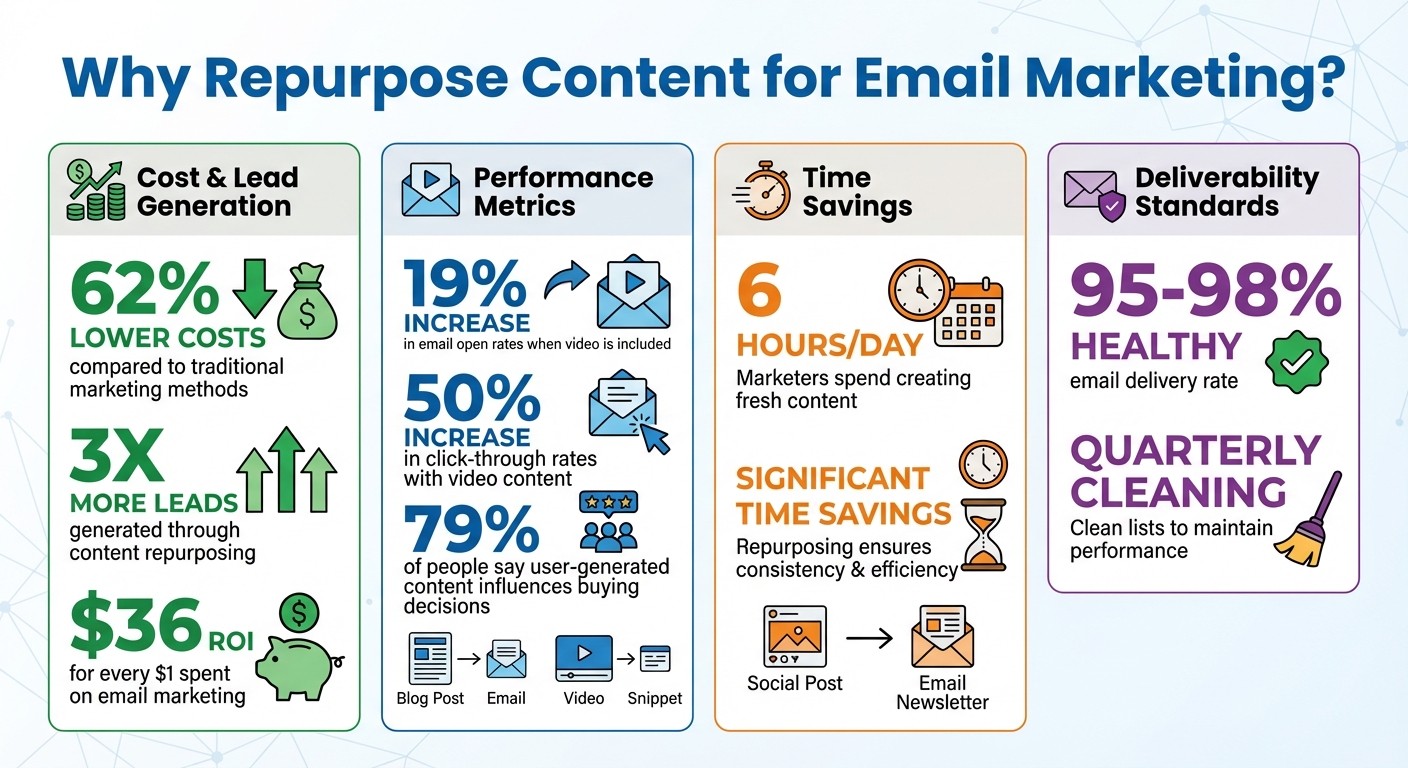
Content Repurposing Benefits and Performance Statistics for Email Marketing
Finding Content to Repurpose
Instead of trying to turn every blog post or video into an email, focus on content that already connects with your audience. The key is to identify pieces that have proven their value.
Start by digging into Google Analytics to find blog posts with high organic traffic and strong conversion rates. Similarly, check the performance of videos and podcasts - look for those with solid view counts or download numbers. Content that has previously driven newsletter sign-ups or product trials is perfect for repurposing into email campaigns [3].
Social media platforms are another goldmine for insights. Posts with lots of shares, comments, and likes reveal topics your audience cares about. For instance, a LinkedIn poll with hundreds of responses or an Instagram post that went viral can inspire email content that grabs attention. Once you've pinpointed these high-engagement topics, focus on those with lasting relevance.
Evergreen content - like how-to guides, tutorials, and FAQs - should be your priority. These types of resources remain useful over time, making them ideal for ongoing email campaigns [4] [5]. Avoid repurposing trending news or time-sensitive material unless you can reframe it into something educational with long-term value. For example, a detailed white paper can be transformed into a five-part email series, or a 30-minute webinar can be broken down into short, actionable snippets [2] [5].
Don’t overlook user-generated content. Customer photos, testimonials, and reviews are powerful tools for building trust and influencing buying decisions [4]. Check your social media mentions for standout customer content, and weave it into your promotional emails for an authentic touch.
How to Repurpose Content for Email
Once you’ve pinpointed your top-performing content, the next step is to reimagine it for email. The key? Don’t just copy and paste - adapt it to fit the inbox.
Converting Blog Posts to Email
Turn blog posts into bite-sized, engaging email content. For example, if you have a 2,000-word SEO guide, pull out the most important points and condense them into a 200-word summary. Include three key takeaways and a clear call-to-action, like a "Read the Full Guide" button, to drive readers back to your site.
Another idea is to split a detailed blog post into an email course. For instance, a comprehensive guide on email marketing could become a 3–5-part series sent over several days. Day 1 might cover building an email list, Day 2 could focus on crafting subject lines, and so on.
You can also create thematic roundups for monthly newsletters. Gather your most popular posts around a specific theme - like "Top Content Marketing Tips" - and present them as short summaries with links to the full articles. To keep your audience engaged, space out reused content by at least 6–8 weeks.
Before sending, update older posts with fresh data and examples to keep them relevant. Add exclusive insights or bonus tips in the email to give subscribers something they won’t find in the original post.
"Repurposing content is the professional marketer’s best friend!" - Simone Morgan, Email Marketing Lead, Nutshell [4]
Next, let’s talk about turning multimedia content into email gold.
Repurposing Videos and Webinars
Videos and webinars are treasure troves of content for email campaigns, but they need some tweaking to work effectively. Instead of embedding full videos, take a screenshot, add a play button overlay, and link it to the video’s hosted location.
For lengthy webinars, summarize the main points in text. This way, subscribers who don’t have time to watch the entire recording can still benefit from the key insights. Another option? Create short, 30-second teaser clips that spotlight the most engaging moments to spark interest and drive clicks.
Tools like Rev.com and Otter.ai make transcription simple. You can share a snippet of the transcript in your email with a link to the full version, appealing to readers who prefer text over video while also improving accessibility.
Want to go a step further? Break a webinar into a multi-part email series. Start with an introductory email to build anticipation, follow up with detailed insights, and wrap it up with actionable steps your audience can implement right away.
Including video in emails can pay off big: it’s been shown to increase open rates by 19% and click-through rates by up to 50% [4].
Now, let’s explore how to use your social media content to create emails that resonate.
Leveraging Social Media and User Content
Your social media posts that already struck a chord with your audience are perfect candidates for email content. Use analytics to identify top-performing posts on platforms like Instagram, LinkedIn, or TikTok, and expand those ideas into more detailed email content.
For example, you could turn a popular Instagram photo or a Twitter poll result into a compelling email story. If you’re using user-generated content - like customer photos, reviews, or testimonials - always get permission first. Then, feature them in themed collections, such as a "Customer of the Month" spotlight or as part of a promotion. This approach builds trust, especially since 79% of people say user-generated content influences their buying decisions [4].
Don’t forget about ephemeral content like Instagram Stories. Save screenshots or download videos to create "best of" highlights for your email subscribers. You can also share poll results or link back to the original social posts to create a loop of engagement that keeps your audience interacting with your brand.
Personalizing Repurposed Email Content
Repurposing content isn’t about copying and pasting the same message to everyone. The key is tailoring that content to align with what your audience actually cares about.
Adding Current Context
For repurposed content to remain relevant, it needs updates. Replace old statistics with fresh ones, and consider adding a "2025 Update" header to signal its freshness and maintain credibility.
Timing plays a huge role here. If a previously covered topic suddenly gains traction on platforms like TikTok or LinkedIn, it’s the perfect opportunity to revisit and refresh that content. For instance, an old piece about "indoor activities during lockdown" can be reimagined as "fun things to do on a rainy day", giving it a timeless appeal [5].
Another way to keep content relevant is by tweaking its focus to match ongoing trends in your industry. Keep the core information intact but update the headline or the opening lines to give it a timely feel. This small adjustment can make even months-old content seem brand new [4].
"Content marketing, which involves repurposing existing materials, costs 62% less than traditional marketing methods while generating three times as many leads." - Stripo [2]
Once updated, make sure these changes resonate with your audience by segmenting your email list for a more targeted approach.
Segmenting Your Email List
After refreshing your content, the next step is delivering it to the right people. Segment your email list based on how subscribers have previously interacted with your content. For example, if someone clicked on your guide to organic gardening, follow up with repurposed content about composting or seasonal planting tips [2]. Similarly, a customer who purchased a fitness tracker would appreciate a "workout tips" series rather than a cooking newsletter.
Letting subscribers self-segment can also be highly effective. Preference forms allow people to choose what interests them - tech enthusiasts can get gadget reviews, while food lovers receive recipe roundups from your past campaigns [2]. You can even adapt the same message into different formats: infographics for visual learners or podcast clips for those who prefer audio [3] [4].
Geographic location is another important factor. Tailor repurposed content by adjusting currency symbols, seasonal references, and local examples. For instance, someone in Minnesota might value "winter survival guides", while someone in Florida would be more interested in "summer travel tips." Both emails could stem from the same original content about seasonal planning but feel personalized to the recipient’s location [2].
Streamlining Your Process and Tracking Results
Repurposing content doesn't have to feel like reinventing the wheel every time. The trick lies in setting up a system that works efficiently, almost like an assembly line. Once the framework is in place, you can focus on fine-tuning instead of starting over.
Setting Up Email Automation
Automation tools can take the repetitive work off your plate once you've configured them. Platforms like MailerLite (starting at $9/month) and Moosend (starting at $7/month for 500 contacts) allow you to trigger emails based on specific actions - whether it’s a visitor checking out your pricing page, abandoning their cart, or downloading a resource [7]. If you're a small business just starting out, Brevo offers a free plan that includes 300 emails per day with unlimited contacts [7].
Before diving into automation, map out your customer journey. What happens after someone subscribes? How do you respond if they click on a gardening tips link but ignore your cooking content? Platforms like ActiveCampaign ($15/month for 1,000 contacts) provide over 900 workflow templates to help you automatically segment subscribers based on their actions [7]. For creators seeking simplicity, Kit (formerly ConvertKit) starts at $39/month and includes a Creator Network for easy cross-promotion [7].
"Email automation takes repetitive tasks off your to-do list to free up your time for other valuable tasks, such as responding to customer questions." – Mailchimp [8]
To keep everything running smoothly, use a content calendar. Tools like Asana or Trello can help you track which blog post is being repurposed, who’s in charge of adapting it, and where it’s headed [6]. This ensures you don’t accidentally reuse the same content too soon or miss the chance to leverage high-performing material. With automation in place, your next step is to monitor the results.
Tracking Email Performance
After setting up automation, it’s crucial to measure how your emails are performing. Keep an eye on open rates to see if your subject lines are grabbing attention, while click-through rates (CTR) reveal whether your content is engaging enough to drive action [9][10]. The ultimate goal, though, is your conversion rate - the percentage of recipients who complete the desired action, like making a purchase, signing up for a webinar, or downloading a guide [9].
Email marketing boasts an impressive average ROI of $36 for every $1 spent [10]. However, achieving that kind of return requires consistent monitoring. Establish a routine - weekly for active campaigns and monthly for automated ones - and look for patterns. For example, if repurposed video content regularly achieves a 50% higher CTR than text-based emails, you’ve identified where to focus your efforts [4].
Compare the performance of repurposed content with brand-new material. Use a simple spreadsheet or your email platform’s analytics dashboard to track these differences. For instance, if a repurposed blog post about seasonal planning generates more engagement as an infographic than as plain text, you’ve gained valuable insights for future campaigns.
Lastly, don’t overlook deliverability. A healthy delivery rate typically ranges between 95% and 98% [9]. If your rate dips below 95%, clean your email list quarterly to maintain its health [10]. Additionally, incorporate UTM parameters in your email links to measure how much traffic and revenue each campaign drives through Google Analytics [10].
Key Takeaways
Repurposing your best-performing content into formats that align with subscriber preferences can be a game-changer. For instance, a detailed blog post can transform into weekly roundups or multi-part email courses. Webinar highlights? Turn them into short video GIFs showcasing the key points. And don’t overlook customer testimonials from social media - they’re great for building trust. This strategy not only cuts costs by 62% but also triples lead generation [2].
Start by auditing your content library with tools like Analytics to identify evergreen pieces that consistently engage your audience [2]. But don’t just copy and paste - think about format. A 3,000-word blog could easily morph into a "top 5 takeaways" email or a visually engaging infographic. Adding videos to emails has been shown to increase open rates by 19% and click-through rates by 50%. Plus, user-generated content plays a major role, influencing 79% of purchasing decisions [4].
You can also turn popular posts into gated guides or email courses to grow your subscriber list [3]. Reusing proven content blocks not only saves time but also ensures efficiency [2].
To measure success, keep an eye on metrics like open rates, click-throughs, and conversions. Compare the performance of repurposed content to the original to see what resonates most with your audience. Considering that marketers often spend six hours a day creating fresh content [1], repurposing offers a practical way to save time while staying consistent in your messaging.
FAQs
How do I choose the best content to repurpose for email campaigns?
Start by diving into your past email campaigns. Identify emails with strong open rates and click-through rates - these are your proven performers. Refreshing these winners for a new audience can save time and deliver results. Evergreen content, like how-to guides or case studies, is especially useful. Since it stays relevant, you can repurpose it without losing its appeal.
Next, take a closer look at your broader content library. This includes blog posts, whitepapers, and even user-generated stories. Pinpoint pieces that already drive engagement and ask yourself: Could this work as a newsletter, a quick tip, or a visual feature? Content that’s easy to break into smaller chunks or update with fresh visuals often translates well into email formats.
Finally, make sure your repurposed content aligns with your email objectives - whether it’s building your subscriber list, nurturing leads, or re-engaging inactive users. Segment your audience carefully to ensure each group gets the right message. If you need an extra boost, a studio like Striking Alchemy can help fine-tune your copy, design, and strategy for maximum impact.
How can user-generated content improve email campaigns?
Incorporating user-generated content (UGC) into your email campaigns can make them much more impactful. Why? Because UGC showcases real experiences from your audience, which helps your brand come across as relatable and trustworthy. When people see others engaging with your product or service, it acts as social proof, fostering a sense of community and encouraging more interaction with your brand.
On top of that, UGC often leads to higher engagement and click-through rates. People tend to connect with content that feels personal and authentic, making them more likely to take action. Plus, it’s a smart way to create high-quality content without putting all the workload on your team. By tapping into the power of UGC, your emails can strike a deeper chord with your audience, ultimately driving stronger results for your business.
How can I tailor repurposed content in emails to different audience segments?
To tailor repurposed content effectively for email campaigns, start by reworking your original material - whether it’s a blog post, video, or another format - so it directly speaks to the specific needs and interests of each audience segment. This way, the message feels fresh and relevant rather than like a repeat performance.
The first step is to define your audience segments. Use data like demographics, purchase habits, or where customers are in their lifecycle (think new subscribers versus long-time loyalists). Once you’ve identified these groups, tweak the content to emphasize what resonates most with each segment. For instance, you could focus on cost-saving strategies for budget-conscious readers or highlight ROI benefits for those aiming to grow their business.
Next, make sure the email’s tone, visuals, and layout align with the preferences of the audience you’re addressing. Personalization tools, like merge tags, can take it a step further by adding names or tailored product suggestions, making each email feel like it was written just for them.
If this process feels overwhelming, studios like Striking Alchemy can step in to help. They can analyze your content, craft segment-specific email templates in tools like Framer, and automate personalization - ensuring each email feels thoughtfully designed while staying true to your brand’s voice.