

Framer is a no-code platform designed for fast, visually-driven website creation. It’s ideal for marketing teams looking to launch campaigns quickly without relying on developers. Here's what you need to know:
Ease of Use: Framer’s drag-and-drop editor and CMS allow non-developers to build and update pages easily. Features like reusable components and AI-generated layouts speed up workflows.
Scalability: Plans range from $10/month for small sites to $100/month for growing brands, with flexible page and bandwidth limits. Overages are charged per use, making it suitable for scaling businesses.
Performance: Framer optimizes sites automatically with tools like predictive pre-loading, image compression, and a global edge network, ensuring fast load times and minimal maintenance.
Integrations: Supports tools like Mailchimp, HubSpot, and Google Analytics, with middleware options for advanced needs. Built-in analytics simplify tracking without extra scripts.
Limitations: Not suited for sites requiring advanced features like user authentication, large content libraries, or custom code export.
Framer is best for teams prioritizing quick deployment and design flexibility over complex functionality. Evaluate your goals, traffic needs, and technical requirements to decide if it’s the right fit.
Ease of Use for Marketing and RevOps Teams
Can Your Team Build and Update Without Developers?
Framer is designed as a no-code platform, making it easy for marketing teams to create and update website pages without needing developer support. Its visual editor feels like a design tool - just drag, drop, and click "Publish" to go live. This eliminates the hassle of manual server deployment or filing IT tickets.
With features like Global Styles, a single change to a color or font updates every page on the site instantly. Similarly, by converting elements like buttons or cards into reusable components, any changes made to the master component flow through the entire site. This approach saves countless hours when updating CTAs, pricing cards, or other recurring elements.
Framer's built-in Content Management System (CMS) simplifies content updates for non-technical users. Whether it’s blog posts or case studies, users can simply fill in fields like headlines, images, or body text, and the layout updates automatically. The platform also takes care of technical tasks like image optimization behind the scenes.
For those on Pro plans ($30/month), Framer includes staging and review tools. It also features an optimization checker that flags issues like broken links or code errors before publishing. Plus, its "View Changes" feature allows teams to track edits and see who made what changes.
This streamlined workflow makes it easier to launch campaigns quickly and efficiently.
How Fast Can You Launch Campaigns?
With Framer, campaigns can go live in hours instead of weeks. Thanks to Framer AI, you can generate a complete, responsive website layout from a simple text prompt in just 30 to 60 seconds. This gives you an 80% complete starting point [3], which you can fine-tune to match your brand.
Need to tweak headlines, CTAs, or images? Framer’s visual editor and on-page editing tools let you make and publish changes instantly. Many users report cutting development time by up to 50% [1].
Task | Estimated Time in Framer |
|---|---|
Initial AI Generation | 30–60 seconds |
Basic Content Edits | 1–2 minutes |
New Landing Page (from Template) | 1–2 hours |
Production-Ready Marketing Site | ~0.5 days |
Framer also handles technical tasks like security updates, SSL certificates, and performance optimization automatically, reducing the workload for RevOps or IT teams. Additionally, you can copy designs directly from Figma and paste them into Framer, which converts layers into responsive HTML with ease. This speed and flexibility make Framer a powerful tool for agile marketing campaigns.
Learning Curve for Non-Technical Users
Framer’s user-friendly design ensures that non-technical users can get up to speed quickly. Its interface, which resembles Figma, includes familiar tools like layers, stacks, and auto-layout. Behind the scenes, Framer generates clean code without requiring users to write CSS.
Most non-technical users can handle basic edits - like updating text or images - within a day or two of first using the platform. Those with Figma experience often become productive within just a few hours. On average, users reach full proficiency after about a week of regular use. Framer also provides a guided onboarding experience and a Quick Start guide covering SEO, CMS, and AI tools.
"Framer's visual editor and CMS let marketers update pages, content, and SEO settings without touching code." – Baskaran Manimohan, Founder, CloseFuture [2]
To maintain consistency across your site, start by building a component library with reusable elements like buttons, cards, and sections. Using stacks and auto-layout instead of absolute positioning ensures your site remains responsive on all devices. This ease of use empowers marketing and RevOps teams to move faster, make updates independently, and focus on driving results without waiting on developers.
Scalability: Growing with Your Brand
Framer’s user-friendly platform is built to grow alongside your brand, offering flexibility and features that match your evolving needs.
Page Limits and Bandwidth for Growth
Framer’s tiered pricing adapts to your business as it scales. The Basic plan ($10/month) supports up to 30 pages and 10 GB of bandwidth. Moving up, the Pro plan ($30/month) allows for 150 pages and 100 GB of bandwidth. For brands experiencing rapid growth, the Scale plan starts at $100/month, offering 300 pages and 200 GB of bandwidth, with the option to expand further. Overages are straightforward: $20 for every additional 100 pages and $40 for every extra 100 GB of bandwidth [4][5][7]. This pricing structure ensures a gradual cost increase as your needs grow, rather than sudden spikes.
However, bandwidth can sometimes be consumed faster than expected. For instance, AI crawlers like GPTBot have been known to use up to 10 terabytes of bandwidth in a single day on some websites [7]. To manage this, Framer recommends hosting videos externally and keeping an eye on usage through the Usage Monitoring panel in Site Settings. Additionally, Framer enhances site performance through a Content Delivery Network (CDN). Basic and Pro plans include coverage from 20 locations, while the Scale and Enterprise tiers expand this to over 300 locations worldwide [7][8].
Collaboration Tools for Expanding Teams
As your team grows, Framer’s collaboration tools are designed to keep everyone aligned and productive. The platform offers real-time multiplayer editing, enabling designers and marketers to work on the same project simultaneously. This feature, reminiscent of Figma, allows live cursors and updates to be visible instantly, ensuring seamless teamwork.
The Pro plan includes 10 editor seats, making it an excellent fit for many growing teams [5]. Need more seats? Additional ones are available for $40 per month each on both the Pro and Scale plans. Larger organizations can benefit from the Enterprise tier, which provides unlimited editor seats [5][8].
Higher-tier plans also include features like staging environments, in-context commenting, and role-based controls. These tools not only streamline workflows but have also been shown to save enterprise users up to $4,000 per month in developer costs [5][6].
Performance and Speed Optimization
How Does Framer Improve Website Performance?
Framer is designed with speed and efficiency in mind, leveraging AWS and a global edge network to cache your site's assets closer to your audience. This setup minimizes latency, ensuring faster load times no matter where visitors are located [9][13]. The platform also employs server-side rendering (SSR) with precise Suspense boundaries, speeding up hydration by an average of 50% [13]. Additionally, Framer automatically converts images to AVIF/WebP formats, compresses content using Gzip or Brotli, and upgrades fonts to WOFF2 for better performance [9][11].
A standout feature is predictive pre-loading. When links come into view, Framer preloads those pages in the background, creating a seamless navigation experience [10]. Another game-changer is the Rolldown bundler, a Rust-based tool introduced in September 2025. It optimizes JavaScript chunks, improving Largest Contentful Paint (LCP) by up to 41% [10][13]. Why does this matter? A one-second delay in page load time can lead to a 7% drop in conversions [13].
The results speak for themselves. In early 2026, brands using Framer's optimization tools saw a 75% reduction in load times, achieved A+ Google Lighthouse scores, and reported a 100% boost in leads within just one month of launching their sites [15]. These automatic enhancements mean you can focus on your goals without worrying about technical upkeep.
Does Framer Offer Zero Maintenance?
Framer takes the headache out of website management by handling all server updates, security patches, and SSL certificate renewals automatically [9][14]. The platform continually upgrades its core engine - like the integration of the Rolldown bundler in 2025 - delivering speed improvements without requiring any input from you [10][13].
Monitoring your site's health is straightforward. Navigate to Menu → Site Settings → Versions, where Framer labels each deployment as "Optimized" or flags "Optimization Errors" if action is needed [12][11]. A detailed version history allows you to revert to stable releases when necessary [9][11].
"Framer's hosting infrastructure is designed to be fast, reliable, and effortless. It combines a global edge network, automatic optimizations, and built-in security so your site performs well everywhere, without manual setup or maintenance." - Framer [9]
Framer’s infrastructure can handle up to 1.7 million unique visitors and 3.2 million pageviews without requiring manual intervention [11]. By combining top-tier performance with zero-maintenance hosting, Framer empowers marketing and RevOps teams to focus on growth, ensuring their websites consistently deliver results while supporting fast campaign launches.
Integration with Marketing and Analytics Tools
Built-in and Third-Party Tool Compatibility
Framer doesn’t just enhance performance - it simplifies marketing workflows through its integration features. It provides native integrations with five mailing tools: Mailchimp, Loops, Formspark, Get Waitlist, and ConvertKit [17]. For platforms like HubSpot, Salesforce, Klaviyo, and Pipedrive, you can use middleware such as Zapier or custom webhooks. Zapier alone connects Framer to over 5,000 applications without any coding, though subscriptions start at $20 per month [18][20].
Framer also makes campaign tracking easy with a dedicated field for GA4 IDs - no coding needed [21][22]. For teams juggling multiple tags, like Meta Pixel or LinkedIn Insight Tag, Google Tag Manager (GTM) acts as a centralized solution [22]. Additionally, Framer includes built-in, cookie-less analytics, which track metrics like page views, unique visitors, traffic sources, and UTM parameters - all without requiring a consent banner [23][25]. This setup ensures that marketing and RevOps teams can monitor campaign performance without hassle.
"Native integrations turn Framer into a connected, automated growth engine." - Benjamin Libor, Framer Integration Specialist, Allsite [16]
It’s worth noting that native integrations offer real-time data and greater reliability, while middleware solutions can introduce delays ranging from 1 to 15 minutes depending on your subscription plan [20]. For advanced tracking, tools like Pimms can be set up in just 5 minutes to handle form tracking and attribution [19]. You can also use hidden fields in Framer forms to capture UTM parameters and tracking IDs [16][19].
How Does Framer Support Data Flow for RevOps?
Framer goes beyond marketing by supporting seamless workflows for RevOps teams. It integrates directly with HubSpot, custom API endpoints, and webhook triggers to enable lead scoring, pipeline management, and automated follow-ups [16]. For tools that lack native support, middleware can help transfer data, though delays may occur. Tools like Attributer can also plug into Framer to capture channel data - such as Paid Search or Organic Social - and pass it to CRMs like Salesforce or Zoho through hidden form fields [24]. These hidden fields ensure accurate lead attribution, which is vital for RevOps strategies.
"Your website is now the first node in your operational infrastructure - not just a marketing asset." - Benjamin Libor, Framer Integration Specialist [16]
To maintain fast site performance while connecting to CRMs, use "async" or "defer" attributes when adding third-party tracking scripts like GA4 or Hotjar [16]. For platforms like MailerLite, Framer’s webhook can work with middleware solutions like Cloudflare Workers to forward data [17]. For GDPR compliance, enterprise-grade integrations can be configured to trigger events and block scripts until user consent is received [16]. These capabilities position Framer as a key tool for building a connected, data-driven strategy.
Cost Alignment with Business Goals
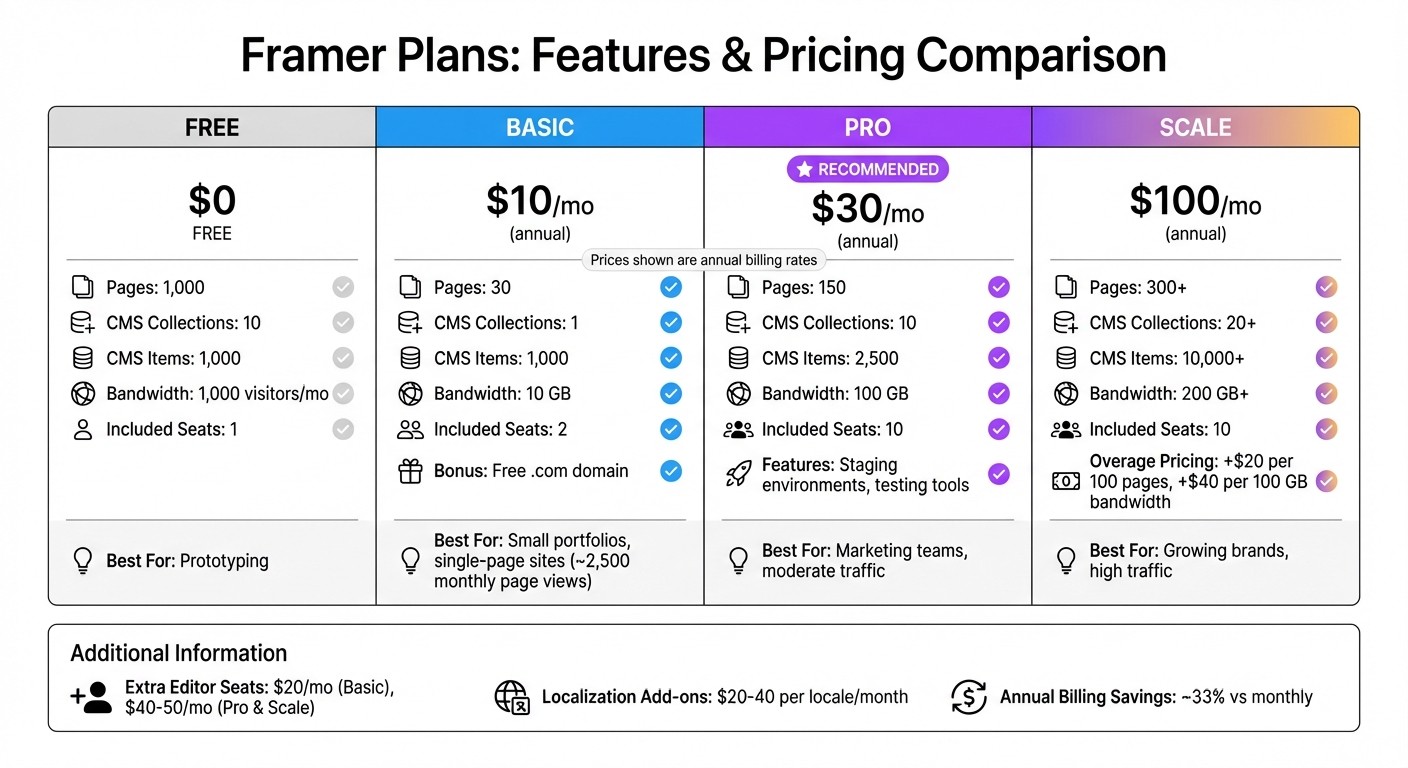
Framer Pricing Plans Comparison: Features, Limits, and Costs
Comparing Framer Plans and Features
Once you've considered ease of use, scalability, and performance, it's time to see if Framer's pricing matches your business needs. Framer offers a range of plans, from a free prototyping option to a $100/month plan tailored for growing brands [5].
Plan | Annual Price | Pages | CMS Collections | CMS Items | Bandwidth | Included Seats |
|---|---|---|---|---|---|---|
Free | $0 | 1,000 | 10 | 1,000 | 1,000 visitors/mo | 1 |
Basic | $10/mo | 30 | 1 | 1,000 | 10 GB | 2 |
Pro | $30/mo | 150 | 10 | 2,500 | 100 GB | 10 |
Scale | $100/mo | 300+ | 20+ | 10,000+ | 200 GB+ | 10 |
For small businesses, the Pro plan often hits the sweet spot. It provides staging environments for testing and enough resources to handle moderate traffic. On the other hand, if you’re managing a simple portfolio or a single-page site, the Basic plan at $10/month (billed annually) includes a free .com domain and is ideal for websites expecting about 2,500 monthly page views [5].
For startups experiencing rapid growth and traffic surges, the Scale plan offers flexibility with usage-based overage pricing. Additional costs include $20 per 100 extra pages and $40 per 100 GB of extra bandwidth, ensuring your site stays online during traffic spikes [5].
Keep in mind the costs of extra editor seats, which are $20/month on the Basic plan and $40–$50/month on Pro and Scale plans [5]. If you're managing multilingual content, localization add-ons cost around $20–$40 per locale each month. Opting for annual billing can save you roughly 33% compared to monthly rates [5].
Long-Term Value and Savings
Framer’s no-code platform can significantly reduce developer expenses. For example, one enterprise user reported saving $4,000 per month, achieving an estimated 8–20x return on investment [5]. This allows marketing and RevOps teams to independently launch campaigns without relying on engineering support.
Implementation costs depend on the project size. A small business website typically costs between $1,800 and $10,000 over a 2–4 week timeline. For medium-sized marketing sites, the range is $10,000 to $30,000, with a timeline of 4–8 weeks [5]. Hosting videos on platforms like YouTube or Vimeo can also cut bandwidth usage by 70–90% [5]. Additionally, Certified Pro Experts may occasionally provide an extra editor seat at no charge [26].
Conclusion: Making the Right Decision for Your Brand
The checklist above can help you decide if Framer aligns with your marketing and RevOps goals.
Framer shines when speed and visual appeal are top priorities. If your team needs to roll out campaigns within days instead of weeks and your site handles fewer than 1,000 CMS items per collection, Framer offers a quick solution with built-in security and performance features.
That said, if your plans involve advanced features like user authentication, native e-commerce, or managing a content library with over 1,000 items per collection, Framer might fall short [27]. Additionally, without code export capabilities, self-hosting or migrating your site would require a complete rebuild [27]. For such needs, a code-first tool or headless CMS could be a better fit. These points tie back to the key factors of ease, scalability, performance, and integration outlined earlier.
Evaluate your content structure, technical requirements, and team expertise before making a decision. Framer is ideal for those prioritizing fast deployment and a design-driven approach, but it’s not the best choice if you need complex database functionality or full source code control. A careful assessment ensures your choice supports your long-term growth plans.
Curious if Framer is right for your brand? Striking Alchemy offers free website audits and migration consultations to help you transition seamlessly from platforms like WordPress, Wix, or Squarespace. Our team ensures your SEO is preserved, performance is maximized, and your new site launches smoothly. Contact us to discuss your migration needs and see if Framer fits your goals.
FAQs
What’s the simplest way to know if Framer can handle our traffic?
Framer is built to handle high-traffic demands with ease. Its built-in speed optimizations, CDN support, and scalability ensure smooth performance, even under heavy loads. Impressively, it can manage up to 1.7 million visitors without incurring extra costs, making it a reliable choice for websites expecting significant traffic.
How do we keep our CRM lead data and attribution accurate in Framer?
To keep your CRM lead data accurate and ensure proper attribution in Framer, consider using tools like Attributer. With Attributer, you can add hidden fields to your forms that capture lead source information. These fields automatically transfer the data to your CRM and other connected tools, making it easier to maintain consistent tracking and reliable data management.
What happens if we need features like login or code export later?
Framer operates within a fully hosted ecosystem, meaning it doesn’t allow for direct code export or self-hosting. This setup can make adding features like user login or exporting the complete source code difficult down the line. Keep this in mind if you anticipate needing such functionality in the future.