

The short answer: Migrating to BigCommerce keeps your SEO intact while giving you a platform that handles growth without constant maintenance. From customizable URLs to built-in performance tools, BigCommerce is designed to make your store faster, easier to manage, and better at turning visitors into customers. A well-planned migration minimizes traffic dips and sets the stage for long-term success.
What this covers: How to protect your search rankings during migration, optimize your site for speed and visibility, and take advantage of BigCommerce’s built-in tools for scaling your ecommerce business. If you’re moving from a platform like WooCommerce or Shopify, this guide will help you avoid common pitfalls and make the most of your new setup.
In short: BigCommerce simplifies ecommerce growth. You’ll learn how to migrate without losing traffic, improve site performance, and leverage tools like structured data and headless architecture to drive revenue. Let’s get into it.
BigCommerce's Built-In SEO Features
BigCommerce takes the hassle out of optimizing your site for search engines. With built-in tools like customizable URLs, automatic 301 redirects, and embedded microdata, you won’t need extra plugins or custom code. Fewer plugins mean fewer risks - no compatibility issues, no extra maintenance, and no threats to your search rankings during or after migration.
Customizable URLs and Site Structure
BigCommerce gives you full control over your URL paths, unlike Shopify, which restricts URLs with mandatory prefixes like /products/ and /collections/. With BigCommerce, you can create clean, flat URLs such as yourdomain.com/blue-running-shoes without unnecessary folders getting in the way[5]. These shorter URLs perform better in search results, improving click-through rates[5].
You can choose from three default URL formats - SEO-optimized (short), long (with /products/ or /categories/), or category-pathed - or create custom structures using placeholders like %productname% or %category%[5][7][8]. When you rename products or categories, the platform automatically sets up 301 redirects, so your link equity stays intact[6][9]. For bulk updates, you can even upload redirect mappings via CSV files[4].
"Managing BigCommerce redirects and maintaining a clean URL structure is essential for ecommerce operators who want to protect their search equity, streamline crawl efficiency, and deliver a greater overall customer experience." - Net Profit Marketing[4]
Why It Matters: Clean, unique URLs ensure search engines focus on high-value pages instead of wasting their crawl budget on duplicates[4][10]. BigCommerce enforces unique URLs for every page, protecting you from duplicate content penalties[6][9].
On top of that, BigCommerce simplifies metadata management, giving your site a boost in search visibility.
Metadata and Structured Data Tools
BigCommerce provides dedicated SEO fields for all types of pages - homepage, product pages, categories, blogs, and more. You can manually enter page titles and meta descriptions directly in the admin panel[6]. Stick to 60–65 characters for page titles to avoid truncation, and aim for meta descriptions around 160 characters for the best display in search results[7][12].
The platform also embeds microdata (rich snippets) into product pages automatically. This means search engines can easily display details like pricing, brand, stock levels, and ratings in search results without extra configuration[11].
"We've built microdata, or 'rich snippets,' into your product pages to enhance your search result listings with information like ratings, pricing, brand and stock levels." - BigCommerce Technical SEO Guide[11]
BigCommerce takes care of canonical tags too, especially in the Cornerstone theme, so search engines know which version of a page to prioritize, avoiding duplicate content issues[6]. It also auto-generates and updates an XML sitemap, which you can submit to Google Search Console to monitor crawl errors and indexing status[6].
With metadata optimized, focusing on speed is the next step to strengthen your SEO.
Speed and Performance for Better Rankings
Google puts speed front and center when ranking sites. Its Core Web Vitals - Largest Contentful Paint (LCP), Cumulative Layout Shift (CLS), and Interaction to Next Paint (INP) - evaluate how fast and stable your site feels to users[10][3]. To stay competitive, aim for an LCP under 2.5 seconds and an INP below 200ms[10].
BigCommerce’s infrastructure makes this easier. Its built-in Content Delivery Network (CDN), Catalyst storefront, and TLS 1.3 support ensure faster load times without needing custom server tweaks[6][9][3]. A fast site not only improves user experience but also helps search engines index your pages more efficiently[6][9]. And with Google’s mobile-first indexing, strong mobile performance is non-negotiable[3].
Why It Matters: Every second of delay in page load time can cost you. A one-second delay drops conversion rates by 7%, while a three-second delay can slash completed purchases by 20%[3]. On the flip side, speeding up your site by just one second can boost conversions by 8.4%[3]. Since 75% of users never go beyond the first page of search results[3], site speed directly impacts your bottom line.
To keep your site fast:
Use modern image formats like WebP or AVIF with lazy loading for non-critical visuals[10].
Regularly audit and remove unused third-party apps or heavy JavaScript[10].
Limit dynamic elements, like product carousels, on your homepage to reduce processing time[3].
Simplify your navigation to improve load times.
BigCommerce’s built-in tools make it easier to hit these speed benchmarks while keeping your site SEO-friendly.
Pre-Migration Planning: What to Do Before You Move
Launching your new BigCommerce store without proper preparation can backfire. A rushed migration might slash your organic traffic by 40–60%, while careful planning can keep dips to just 10–20% before recovery [13].
Running a Pre-Migration SEO Audit
Before you touch a single product, create a detailed snapshot of your current site. Tools like Screaming Frog or Sitebulb can crawl every URL, capturing data like status codes, title tags, meta descriptions, H1s, canonical tags, and word counts [13][14]. This inventory is crucial for building accurate redirect maps and maintaining performance when you switch platforms.
Act quickly to pull 12 to 16 months of data from Google Search Console and Google Analytics. Since Search Console only keeps 16 months of history, any delay could mean losing valuable insights [13]. Identify your top-performing pages - these typically make up 20% of your site but drive 80% of your organic traffic [14]. Mark these as high-priority for migration.
Run a backlink audit using tools like Ahrefs or SEMrush. Pages with five or more referring domains should be flagged as "High-Priority" in your URL map. Strong backlinks are too valuable to risk losing [13].
"The goal of an SEO migration is not to gain traffic. It is to not lose the traffic you already have." - EcomSEO [13]
Document your site structure, including navigation, footer links, and breadcrumb paths. Replicate or refine these on BigCommerce [13]. Screenshots of your top 20 organic landing pages can help you compare layouts, internal links, and content once the new site is live [13]. Don’t forget to list all media files - images, PDFs, and other assets - because their URLs often change during migrations [15].
Why It Matters: Skipping these steps risks leaving key pages unaccounted for, making effective redirects nearly impossible.
Creating Your Migration Plan
Once the audit is done, map out a clear migration plan. Start by categorizing pages into tiers: Tier 1 for top revenue-drivers, Tier 2 for high-traffic pages, and Tier 3 for the rest. Redirects for Tier 1 pages should be your top priority, as they have the biggest impact on your revenue [17].
Every old URL needs a corresponding 301 redirect to its new BigCommerce location. Avoid 302 redirects - they don’t transfer ranking signals effectively [13][17].
"The redirect map is the single most important deliverable - every old URL must have a corresponding 301 redirect to its new location." - Sarah Mitchell, E-commerce & Marketing Editor, ProPicked [17]
Freeze content updates during the migration process. Export all optimized content - like category descriptions, meta tags, and blog posts - and verify it manually on BigCommerce. Automated imports can miss details, so double-check everything [13][16][17].
Don’t combine your migration with a major redesign or content overhaul. Move to BigCommerce first, let the site stabilize for 2–3 months, and then work on design updates [13][16]. Changing too much at once makes it harder to pinpoint the cause of any traffic drops.
With a solid plan in place, you’ll set yourself up for a smooth transition to BigCommerce. Proper preparation ensures your traffic and rankings stay intact.
How to Migrate to BigCommerce Step-by-Step
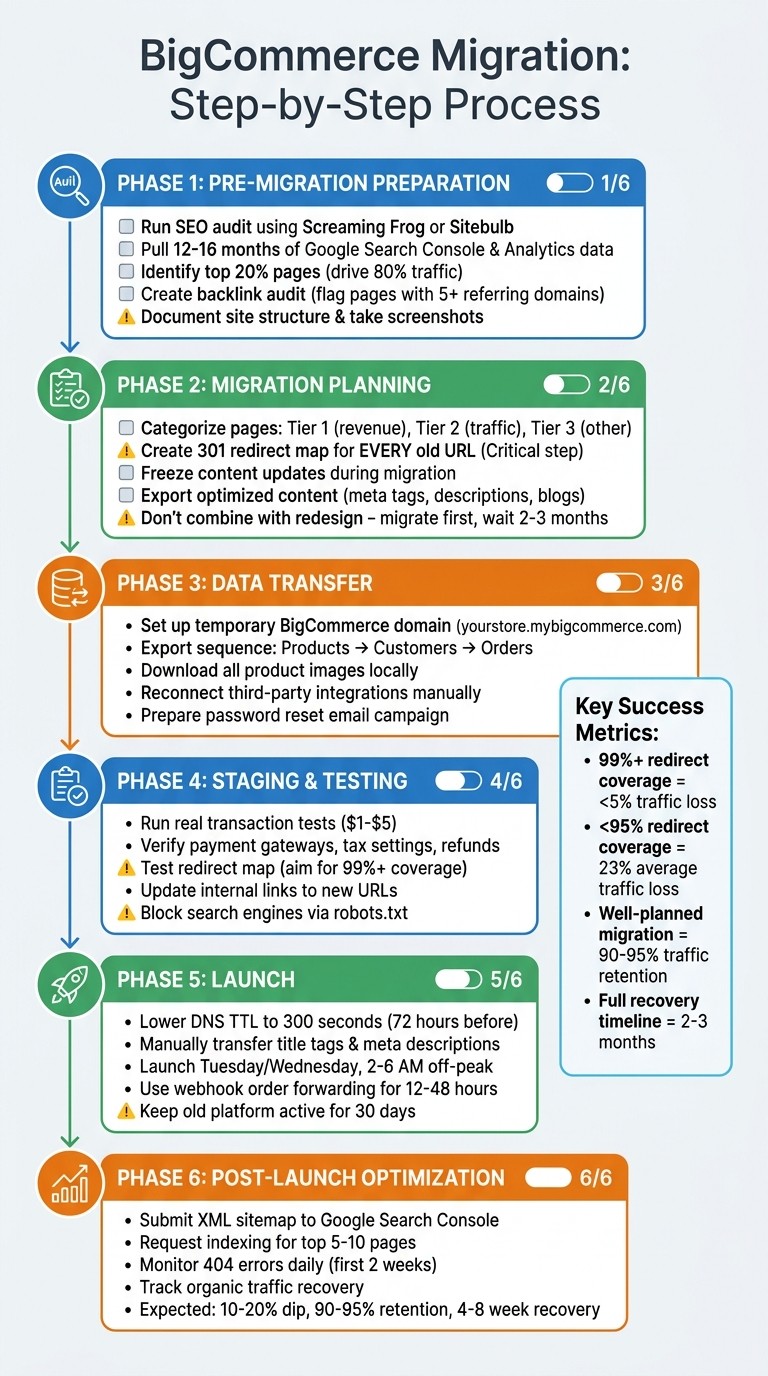
BigCommerce Migration Step-by-Step Process Guide
Now that you’ve completed your audit and prepared a redirect map, it’s time to tackle the actual migration. The key here is patience - rushing through data transfers or skipping testing can cost you both traffic and revenue.
Moving Content and Data to BigCommerce
Start by setting up a temporary BigCommerce domain, such as "yourstore.mybigcommerce.com." This parallel environment will act as your workspace. Follow this sequence to export data: Products first (including all variants, descriptions, and images), then Customers (complete with addresses and account details), and finally Orders for maintaining historical records. If your old platform’s CDN is shutting down, download all product images locally to avoid losing them [19].
For stores with large catalogs, automated tools like Cart2Cart can save you effort. These tools handle bulk transfers for $69–$499+, but you’ll need to manually check important pages afterward.
Don’t forget your third-party integrations - email marketing, reviews, and loyalty programs won’t migrate automatically. Reconnect these services manually [19]. Additionally, customer passwords can’t be transferred due to BigCommerce’s bcrypt hashing. Prepare a password reset email campaign to go live on launch day [19].
Why It Matters: When the fashion brand White Stuff transitioned to a headless BigCommerce architecture in 2025, they achieved a 100% boost in ecommerce growth [1]. A clean, organized data migration lays the groundwork for similar success.
Once your data is in place, the next step is a detailed staging test to identify and resolve any issues before the big launch.
Setting Up and Testing a Staging Site
After migrating your content, test everything in a staging environment. This is where you validate that all critical functions work as expected. Run small real-transaction orders ($1–$5) to confirm payment gateways, tax settings, and refund processes [19]. Tax misconfigurations alone account for 40% of post-migration support tickets, so double-check these carefully [19].
Next, test your redirect map on the staging site. Aim for 99%+ redirect coverage - sites that meet this benchmark typically lose less than 5% of traffic. On the other hand, sites with less than 95% coverage can see traffic losses averaging 23% [19]. Update all internal links to point directly to the new URLs, as redirect chains can slow Google’s crawlers and weaken your ranking signals [14][17].
Make sure to block search engines from indexing your staging site by configuring the robots.txt file. Once your site goes live, replace this with the production version [14][20].
Protecting Your SEO During Migration
Once staging is complete, take these steps to protect your SEO as you transition. At least 72 hours before launch, lower your DNS Time-to-Live (TTL) to 300 seconds (5 minutes). This speeds up global propagation when the switch happens. Manually transfer all title tags and meta descriptions from your old site - letting BigCommerce auto-generate them can hurt your rankings [19][17].
"Zero-downtime migration isn't about speed - it's about running both your old and new platforms simultaneously during the transition."
– Danielle, Duck Soup Ecommerce [19]
Schedule your launch for a Tuesday or Wednesday during off-peak hours (2–6 AM). This gives your team several business days to address any issues before the weekend [19][17]. Even after the DNS switch, expect about 25% of traffic to hit your old site for the first 12–48 hours due to DNS caching. Use webhook-based order forwarding to sync real-time data from your old platform to BigCommerce’s API during this period [19].
Post-launch, submit your new XML sitemap to Google Search Console and request indexing for your top 5–10 revenue-driving pages [14][20]. Monitor 404 errors daily for the first two weeks and resolve missed redirects immediately [17]. Finally, keep your old platform subscription active for at least 30 days to ensure all historical data is backed up and no stray orders are left behind [19].
Taking these careful steps ensures that your migration preserves the SEO equity you’ve worked hard to build. A well-planned migration typically retains 90–95% of organic traffic, with only a temporary dip of 10–20% in the first 2–4 weeks [17].
Optimizing SEO After Migration
Once your site is live and redirects are in place, it’s time to focus on post-launch SEO. The first month is critical - it’s when you’ll either regain your momentum or risk losing it. This phase is all about addressing crawl errors, monitoring performance, and ensuring your site’s SEO foundation is solid.
Submitting Sitemaps and Checking for Crawl Errors
BigCommerce simplifies things by automatically generating an XML sitemap at yourdomain.com/xmlsitemap.php. Submit this sitemap to Google Search Console (GSC) immediately after launch [2][21]. If you’ve changed your domain, use GSC’s "Change of Address" tool to notify Google. This initiates a 180-day process where Google transfers SEO signals to your new domain [16].
Within a day of submission, check the "Pages" report in GSC and review 404 error logs in Google Analytics. If you see a spike in 404 errors, it’s a sign that some redirects may have been missed [14]. Use GSC’s URL Inspection tool to manually request indexing for your most important revenue-generating pages [14].
Why This Matters: SEO migrations that address crawl errors quickly often stabilize in 2–4 weeks, with full recovery taking 2–3 months [14]. Sites that fix issues early can retain over 90% of their organic traffic. On the flip side, ignoring these errors can lead to permanent traffic losses of 40–60% [13].
Run a full site crawl using tools like Screaming Frog or Sitebulb to identify broken internal links, redirect chains, and loops [14][23]. Check a sample of 20+ parameterized URLs to confirm that canonical tags point to the correct base category URL - this prevents unnecessary pages from being indexed [22]. Keep an eye on GSC’s "Crawl stats" to ensure Googlebot is navigating your new site structure without hitting server errors [14].
Once these technical issues are resolved, shift your focus to optimizing metadata and enhancing your site’s visibility in search results.
Improving Metadata and Rich Snippets
BigCommerce allows you to manually edit title tags and meta descriptions, giving you full control. Optimize title tags (keep them under 60 characters) and meta descriptions (around 160 characters) with targeted keywords and compelling calls-to-action to improve click-through rates [2].
Add structured data markup for products, reviews, and FAQs. This enables rich snippets, which can make your search results stand out - think star ratings, pricing, and other key details. For content pages and blogs, enabling Accelerated Mobile Pages (AMP) can significantly improve load times and boost mobile search visibility [2].
Monitoring SEO Performance Metrics
Mark your migration date as an annotation in Google Analytics 4 - it’ll help you contextualize performance data later [14][16]. For the first 30 days, closely monitor daily organic traffic by landing page to ensure high-traffic pages are recovering [13][14]. Track rankings for priority keywords, and investigate immediately if rankings drop by more than 10 positions [13][14].
Compare the number of indexed pages on your new site to your pre-migration baseline using GSC. Sudden drops in indexed pages could indicate indexing issues [14][16]. Pay attention to Core Web Vitals: aim for an LCP of ≤2,500 milliseconds, INP of ≤200 milliseconds, and CLS of ≤0.1 [16].
"The goal of an SEO migration is not to gain traffic. It is to not lose the traffic you already have. Any migration that preserves 90%+ of organic traffic within 8 weeks is a success."
– EcomSEO [13]
It’s normal to see a 10–20% dip in traffic during the first two weeks [13]. With a solid migration plan, organic traffic typically rebounds to pre-migration levels within 4–8 weeks [13][14]. Schedule full site audits at 30 and 90 days post-migration to catch any lingering issues. Keep your 301 redirects in place for at least a year to preserve link equity from external sources and old backlinks [13][16].
Using BigCommerce to Scale Your Ecommerce Business
Once you've successfully migrated, tapping into BigCommerce's advanced features can accelerate your growth. With a strong SEO base, this platform offers tools designed to help you scale efficiently.
BigCommerce Features That Drive Growth
BigCommerce's headless and composable architecture separates your site's frontend from the backend, allowing you to update customer-facing elements up to three times faster without disrupting core operations [1]. Headless frameworks also deliver 40–60% faster load times, which directly impacts conversions - just a one-second delay can cost you sales [1].
For businesses operating in B2B or hybrid models, the B2B Edition simplifies complex workflows without requiring expensive custom development [1]. Enterprise clients can take advantage of Punchout integrations (e.g., Coupa and SAP Ariba), enabling customers to shop directly through their procurement systems and streamline their purchasing process [1].
BigCommerce also excels in multi-channel selling through Feedonomics, which syncs product data across global marketplaces and social platforms from one central hub [1]. The platform's API-first design ensures seamless integration with ERP, CRM, PIM, and OMS tools, reducing manual data entry and improving efficiency [1].
Feature | Impact on Growth | Benefit |
|---|---|---|
Headless Architecture | 3x faster innovation cycles [1] | Easier frontend and backend management |
B2B Edition | Automates account-based pricing [1] | Simplifies quote-to-order workflows |
Open APIs | Connects tools seamlessly [1] | Reduces manual work with ERP/CRM integration |
Feedonomics | Expands marketplace reach [1] | Centralizes global sales channel management |
Why This Matters: Nearly half of online retailers (46%) now prioritize replatforming to keep up with evolving technology [1]. BigCommerce's SaaS infrastructure provides automatic updates and security patches, reducing IT workloads and cutting total costs by 40% compared to older systems like Adobe Commerce or Magento [1]. For example, in 2025, Movora adopted a headless architecture on BigCommerce and saw a 37% boost in conversion rates by enhancing user experience and site flexibility [1]. Similarly, White Stuff transitioned to headless and doubled its ecommerce revenue [1].
But scaling isn't just about performance - it's also about staying visible as search trends shift, especially with the rise of AI-powered tools.
Optimizing for AI-Powered Search Tools
AI-driven platforms like ChatGPT, Google AI Overviews, and Perplexity are reshaping how customers discover products. These tools favor stores with structured data and strong digital PR mentions [24].
To stay competitive, integrate JSON-LD structured data for your products, FAQs, and reviews. This ensures AI tools can accurately pull and recommend your catalog [24]. Securing high-quality mentions and maintaining top search rankings is vital - 75.1% of clicks go to the top three organic results [25], and AI tools rely heavily on those rankings.
Voice search is another growing trend. Optimize for it by creating FAQ pages that use conversational language to match the natural tone of voice queries [26]. Voice searches are often longer and more question-based than typed ones, so tailoring your content to this format can give you an edge.
As search evolves, staying ahead means continuously refining your site's SEO and performance.
Maintaining and Improving Your Site Over Time
Scaling isn't a "set it and forget it" process - it requires regular upkeep. Start by monitoring Core Web Vitals: aim for an LCP of ≤2,500 milliseconds, an INP of ≤200 milliseconds, and a CLS of ≤0.1. Nearly 90% of users abandon slow-loading sites, making performance a direct revenue driver [24].
Schedule SEO audits 30, 60, and 90 days after major updates to catch issues like 404 errors, redirect chains, or ranking drops [27]. Use WebP image formats and implement lazy loading for below-the-fold content to speed up load times [24]. After making structural changes, update and resubmit your XML sitemaps to Google Search Console and Bing Webmaster Tools to ensure quick indexing [27][2].
Regularly clean up your site by organizing databases, maintaining proper parent-child product relationships, and removing unused apps or scripts that contribute to "plugin sprawl" [18][1]. Keep your site structure simple - no more than three clicks from the homepage to any product - to make it easier for search engines to crawl and index [28]. Use internal linking strategies to funnel link equity from high-traffic pages to key categories and products, signaling expertise to search engines [24].
"Replatforming isn't just about fixing what's broken; it's about building for what's next."
– Haylee Clark, BigCommerce [1]
In February 2026, Veils by Lily improved its mobile performance by cutting Total Blocking Time from 570ms to 100ms and reducing its Speed Index from 8.8 seconds to 7.2 seconds. By eliminating unnecessary scripts and prioritizing essential content, the brand increased mobile engagement and reduced cart abandonment [27]. This kind of ongoing optimization is what sets high-growth businesses apart.
Why This Matters: B2B ecommerce migration spending is expected to hit $4.2 billion by 2025 [1]. Platforms like BigCommerce can reduce the cost of updates and changes by 40% compared to legacy systems [1]. Regular optimizations aren't just about maintenance - they're how you stay competitive and protect the SEO gains you've worked hard to achieve.
Conclusion
Switching to BigCommerce isn’t just about changing platforms - it’s about setting your business up for growth. This guide has laid out how a thoughtful migration protects your SEO while giving you the tools to scale. BigCommerce eliminates the headaches of technical debt and maintenance, cutting change costs by about 40% compared to older systems like Adobe Commerce or WooCommerce [1]. With built-in B2B features, headless architecture, and open APIs, it’s designed to grow with your business.
But the work doesn’t stop after the migration. Post-launch optimization is where the real results come in. Keeping an eye on Core Web Vitals, managing 301 redirects, adapting to AI-driven search tools, and fine-tuning site performance are all ongoing tasks that make a difference. With nearly 46% of online retailers focusing on replatforming and B2B ecommerce migration spending expected to reach $4.2 billion by 2025 [1], the move to platforms like BigCommerce is becoming the norm for serious brands.
BigCommerce speeds up growth by delivering enterprise-level performance without relying on endless plugins. Headless frameworks on the platform can boost load times by 40–60%, which matters - every second of delay can drop conversions by 7% [1].
If you’re ready to make the switch and want a smooth migration with lasting SEO results, Striking Alchemy is here to help. We specialize in BigCommerce and Shopify development, platform migrations, and SEO+GEO optimization, ensuring your site isn’t just functional but ready to scale.
Built by Striking Alchemy - a web design & SEO studio in Cranberry Township, PA. Nick Kosanovich has been crafting websites for over 20 years. We work exclusively with Framer, focusing on custom web design, platform migrations, and SEO+GEO. Learn more about our ecommerce development services.
FAQs
How long does SEO recovery take after migrating to BigCommerce?
When you move to BigCommerce, SEO recovery typically takes about 4 to 8 weeks - provided you’ve planned carefully. The exact timeline depends on how complex the migration is and how well you execute key steps like URL mapping and setting up redirects. Following these practices ensures your search rankings stay intact and helps you bounce back faster.
What should I include in a 301 redirect map for a BigCommerce migration?
When you're building a 301 redirect map for a BigCommerce migration, focus on keeping your existing URLs intact for both search rankings and user experience. Match every old URL to its new location on BigCommerce, starting with pages that get the most traffic or have the most backlinks. Aim to correctly map at least 95% of your URLs to protect your SEO performance and avoid any broken links. This ensures a smoother experience for both users and search engines.
How do I keep Google from indexing my staging BigCommerce site?
To keep Google from indexing your BigCommerce staging site, you’ll need to update the robots.txt file to block crawlers and add a "noindex" meta tag to the staging pages. The robots.txt file stops crawlers from accessing the site, while the "noindex" tag ensures the pages don’t get indexed.
For added protection, you can implement HTTP authentication or use canonical URLs that point directly to your production site. Using these methods together creates a solid approach to keeping your staging site invisible to search engines.