
Your website might be costing you more than you think - not because of what you’re spending, but because of what it’s missing. Most Pittsburgh business sites are stuck in brochure mode: slow, outdated, and invisible to local customers searching for services. That’s a problem you can fix.
The short answer: A high-performing local website isn’t just about looking good. It’s about being fast, mobile-friendly, and built to convert visitors into customers. Add hyper-local content, structured data, and consistent updates, and you’ll start ranking higher and turning clicks into calls.
What you’ll learn here: The five biggest mistakes Pittsburgh businesses make with their websites - and how to fix them. From local SEO missteps to slow platforms, we’ll cover practical ways to make your site stand out in a competitive market. If you’re a small business owner in Pittsburgh, this guide is for you.
Let’s break it down.
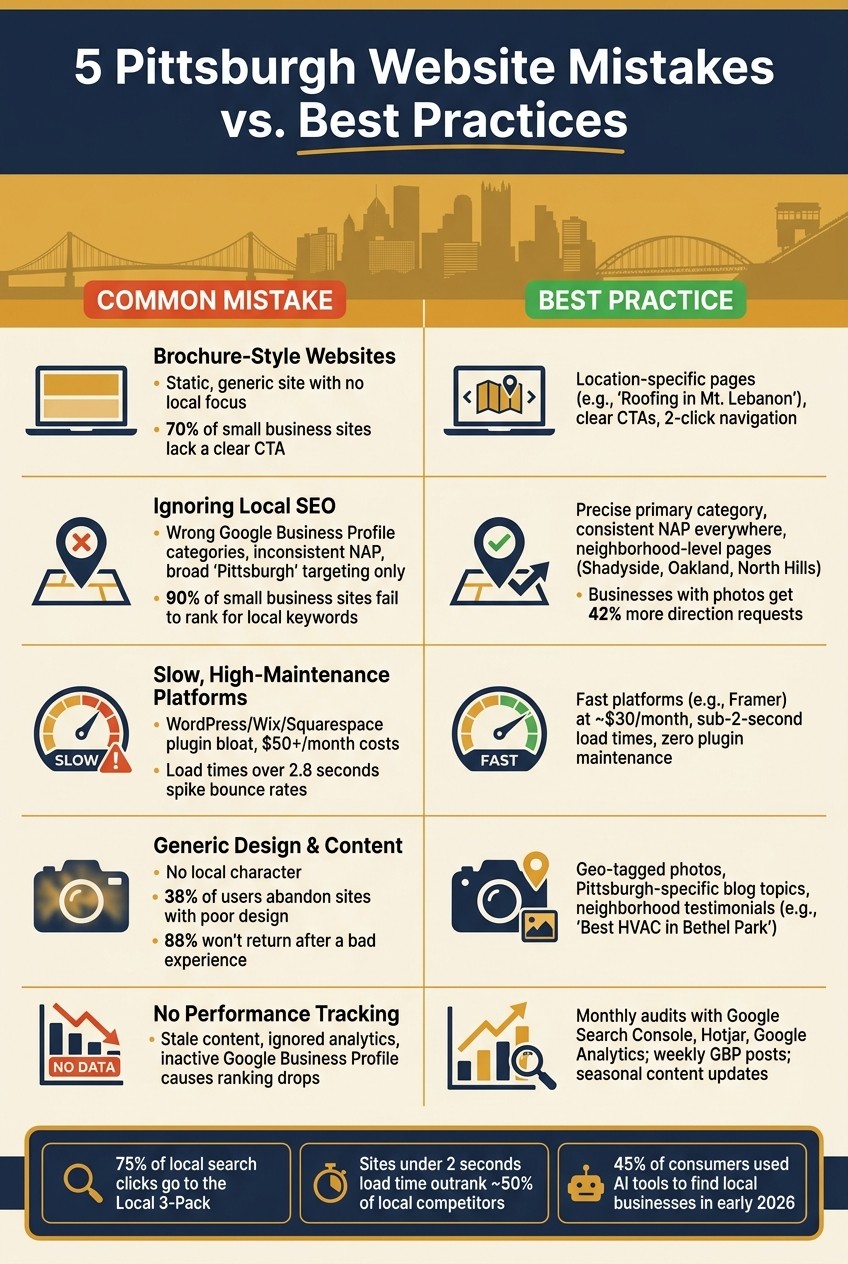
5 Pittsburgh Website Mistakes vs. Best Practices at a Glance
Mistake 1: Treating the Website Like an Online Brochure
Problem: Static, Generic Sites With No Local Focus
Too many Pittsburgh small business websites follow the same uninspired formula: a homepage with a catchy tagline, a generic services page, and a contact form buried at the bottom. These sites do little more than announce your existence - they don’t inspire action.
The issue isn’t just about appearance. Static, brochure-style websites fail to provide the local context search engines rely on. If your site doesn’t mention the neighborhoods you serve, the specific problems you solve, or your connection to the community, Google won’t prioritize you when someone in Lawrenceville or Mt. Lebanon searches for your services. As Hackworth Marketing puts it: "Search engines cannot rank what they do not understand." [9]
The rise of AI-driven search tools has widened the gap. By January 2026, 45% of consumers were using platforms like ChatGPT to find local businesses, a massive jump from just 6% the year before. [10] Static sites, which often lack structured data like schema markup, are invisible to these systems.
"If your website reads like a brochure with no structured data, AI engines have nothing to work with." - Connectica [10]
Even if people find your site, there’s another hurdle: 70% of small business websites don’t include a clear call to action. No “Request a Free Quote,” no “Schedule a Consultation,” no obvious next step. Visitors leave without converting, and your site remains a passive tool in an environment that demands action.
Solution: Build the Site Around Local Goals
Your website should have one job: get Pittsburgh visitors to take action. Whether that’s booking a call, requesting a quote, or finding directions, every element of your site - from navigation to button text - should make that goal crystal clear.
Start by ditching vague service pages in favor of location-specific ones. A generic “Services” page for all of Pittsburgh misses the mark. Instead, create targeted pages like “Roofing Services in Mt. Lebanon” or “Emergency Plumber in the South Side.” These pages align with the exact search terms people use when they need immediate help, signaling to Google that your site is relevant.
Navigation is just as critical. Make sure visitors can find your phone number, services, and hours within two clicks of the homepage. Hiding this information behind a “Learn More” button is a surefire way to lose leads. As Power On Marketing puts it:
"'Learn More' is not a call to action – it's a call to nap." [12]
Here’s how a locally optimized site stacks up against a static brochure site:
Feature | Static Brochure Site | Locally Optimized Site |
|---|---|---|
Content | Generic, rarely updated | Focused on local areas, updated regularly |
Navigation | Overcomplicated or hidden | Simple, two-click access to key info |
Goal | Passive info display | Designed for lead generation |
Search Focus | Broad or irrelevant keywords | Long-tail, location-specific keywords |
Mobile | Clunky or desktop-focused | Fast, responsive, mobile-friendly |
To improve visibility, make your NAP (Name, Address, Phone number) visible in plain text on every page. Avoid hiding it in images or PDFs. This simple step helps search engines and AI tools associate your business with a specific Pittsburgh area, boosting your local search rankings. [11]
"Your website should answer one question quickly: 'Can this business solve my problem right now?'" - John Moffitt, Elvin Web Marketing [11]
Mistake 2: Ignoring Local Search Basics
Problem: Weak or Misaligned Local Signals
A lot of small businesses in Pittsburgh have a Google Business Profile, but having one and making it work for you are two very different things.
Take categories, for example. If a plumber selects "Contractor" instead of "Plumber", they’re going to rank lower than competitors who chose the more precise option. Then there’s the issue of NAP inconsistencies. When your business name, address, and phone number (NAP) vary across platforms - like showing "Smith Plumbing" on Yelp but "Smith Plumbing LLC" on Facebook - it confuses Google. Outdated phone numbers or mismatched details erode trust, which directly affects your rankings.
Geographic targeting is another common misstep. Many businesses just use "Pittsburgh" as a general term, but locals often search by neighborhood - think "Shadyside dentist" or "South Side electrician." If your site only mentions Pittsburgh broadly, you’re invisible to those specific searches. While localized content helps connect with visitors, it’s equally important to ensure search engines understand your service area.
"A plumber who picks 'Contractor' as their primary category will lose to the plumber who picks 'Plumber.' Google uses your primary category to decide which searches to show you for." - Andrew Hersh, PA Digital Studio [3]
The data backs this up. The Local 3-Pack - the top three map results - grabs about 75% of all clicks for local searches [3]. Yet, 90% of small business websites fail to rank for meaningful local keywords because of basic SEO errors [13]. Weak or mismatched signals mean you’re not even in the running for those clicks.
Review velocity also plays a big role. It’s not just about how many reviews you have; it’s about how recent they are. A business with 25 reviews, five of which are recent, will often outrank one with 200 outdated reviews [3].
If these issues sound familiar, there’s good news: you can fix them. Here’s how to build a stronger local search presence.
Solution: Build a Strong Local Search Presence
Start by getting your NAP details in order. Your business name, address, and phone number need to be consistent everywhere - on your website, Google Business Profile, Yelp, Bing, and Facebook. Even small differences, like "St." versus "Street", can create confusion. Use your Google Business Profile as the ultimate reference point and audit every listing to match it.
Next, give your Google Business Profile the attention it deserves. Pick the most accurate primary category for your business, and fill out every single field - services, hours, photos, and products. Adding photos alone can make a huge difference: businesses with photos get 42% more direction requests and 35% more clicks to their website [8]. Regular updates, like posting on Google, also signal activity to search engines.
"Your Google Business Profile deserves more attention than your website." - Steve Japalucci, PGHdma [8]
To boost neighborhood-level visibility, ditch generic "Service Areas" pages. Instead, create dedicated pages for specific areas like Mt. Lebanon, Cranberry Township, or North Hills. Mention local landmarks or past projects to connect with how residents actually search.
For instance, in 2026, JitaCam - a Pittsburgh-based broadcast equipment rental company - optimized its Google Business Profile and fixed technical SEO issues. In just four months, they climbed to the top 1–3 positions for their main keywords, boosting organic traffic by 120% without spending on ads [2].
Table: Local SEO Quick Reference - Key Actions for Pittsburgh Rankings
SEO Element | Impact on Pittsburgh Rankings | Recommended Action |
|---|---|---|
Primary Category | High - relevance signal | Select the category that top competitors use |
NAP Consistency | Medium - trust signal | Audit and standardize listings on Yelp, Bing, etc. |
Neighborhood Content | High - local relevance | Create pages for areas like Oakland or North Hills |
Review Velocity | High - prominence signal | Request 2–3 new reviews monthly to stay competitive |
Local Schema | Medium - technical signal | Add LocalBusiness schema to your website’s footer |
Finally, don’t skip LocalBusiness schema markup. This structured data tells Google exactly what you do and where you operate - a technical detail that many local businesses overlook [3][13].
Why It Matters: The Local 3-Pack is where the battle for local customers is won. While you can’t control how close someone is to your business, you can control how relevant and visible you are by optimizing categories, content, reviews, and schema.
Mistake 3: Sticking With Slow, High-Maintenance Websites
Problem: Heavy Platforms That Drain Time and Money
Even the best local SEO efforts can't save a slow website - and often, the platform itself is the problem.
WordPress, Wix, and Squarespace are the go-to platforms for many small businesses, but they come with hidden costs that add up fast. WordPress, in particular, is notorious for encouraging plugin overload. You add a plugin for speed, another for security, one for forms, and another for caching, and before you know it, your site is bloated, sluggish, and expensive to maintain. Between premium themes, page builders, and essential plugins, the monthly cost for a WordPress site often exceeds $50 [15].
The performance impact is real. When load times go beyond 2.8 seconds, bounce rates skyrocket [14]. Google penalizes sites that take over 4 seconds to load, while those under 2 seconds gain a competitive edge in local search rankings [3]. A slow site doesn't just annoy visitors - it actively damages your visibility and credibility.
"Long load times can trigger significant user frustration. That's not the brand association you want." - Ben Kostenbader, Founder, Dot Foundry [14]
The maintenance headaches only grow. Skipped updates and missed patches turn a once-decent site into a slow, vulnerable liability. Ben Kostenbader calls this technical debt: "If your content platform can't grow with you, you're building technical debt into your marketing foundation. And you'll pay for it later - in time, budget, and credibility." [14]
The solution? Stop patching the problem and switch to a platform designed for speed and simplicity.
Solution: Upgrade to Faster, Easier-to-Maintain Platforms
A fast, streamlined site doesn't just make visitors happy - it boosts your local rankings in Pittsburgh. The answer isn’t piling on more plugins; it’s choosing a platform that avoids these issues entirely.
Framer offers a clean alternative. It eliminates plugin headaches, reduces costs, and delivers consistently fast load times right out of the box. There’s no plugin ecosystem to manage, no security patches to worry about, and no complicated hosting setups. For most businesses, a Framer plan costs around $30/month [15] - often cheaper than WordPress once you factor in all the extras, and without the constant upkeep.
The goal is straightforward: get your load time under 2 seconds. That alone puts you ahead of about half your local competitors [3]. Start by checking your site’s performance with Google PageSpeed Insights. If your mobile score is below 70, it’s a clear sign your platform is holding you back [2]. If you’re using WordPress, Wix, or Squarespace and struggling with low scores, no amount of tweaking will fully fix the underlying issues.
Feature | WordPress / Wix / Squarespace | Framer |
|---|---|---|
Typical monthly cost | $50+ (hosting + plugins + themes) | ~$30/month |
Plugin maintenance | Ongoing - updates, conflicts, patches | None |
Default load performance | Variable - depends on plugin stack | Fast out of the box |
Mobile-first design | Requires additional configuration | Built in |
Technical debt over time | Accumulates with each added plugin | Minimal |
At Striking Alchemy, we don’t touch WordPress - not because of preference, but because of principle. We exclusively build on Framer because it performs better, costs less to maintain, and spares Pittsburgh businesses from the technical baggage that slows sites down and eats into budgets. If you’re stuck on WordPress, Squarespace, or Wix, we handle every step of the migration process.
Why It Matters: A slow website doesn’t just frustrate visitors - it actively costs you rankings and customers. Faster sites rank higher, keep visitors engaged longer, and convert more Pittsburgh traffic into paying customers. In short, speed drives growth.
Mistake 4: Ignoring the Pittsburgh Audience in Design and Content
Connecting with your audience in Pittsburgh goes beyond optimizing for search engines or having a fast website. It starts with a design and message that feels like home to the people living there.
Problem: Generic Design and Copy With No Local Character
A cookie-cutter website is a wasted opportunity - especially in Pittsburgh, where people take pride in supporting businesses that feel local.
Too many small businesses fall into the trap of blending in. They might mention "Pittsburgh" once in the footer, but that's it. Visitors who don't immediately feel a connection will leave. Consider this: 38% of users abandon sites with poor design or layout [7], and 88% won’t return after a bad experience [16]. In a city where people often search by neighborhood - like "Squirrel Hill plumber" or "Shadyside dentist" [3] - a generic site doesn’t just fail to stand out; it disappears.
If your website doesn’t reflect Pittsburgh’s personality, you’re missing the chance to connect with the customers most likely to choose you.
Solution: Ground Design and Content in Pittsburgh
The solution is straightforward: make your site speak to Pittsburgh’s unique vibe and needs.
Start by tailoring your content. Don’t just talk about "plumbing" - talk about preventing frozen pipes during Pittsburgh's frigid winters. This approach not only helps your audience but also shows you understand their specific challenges.
Ditch stock photos and use geo-tagged images of your actual work. Highlight projects near local landmarks like the Smithfield Street Bridge, a storefront in the Strip District, or homes in the North Hills. These visuals don’t just add authenticity; they also help search engines and visitors see your genuine connection to the area.
Testimonials are another powerful tool. A review like "Best HVAC repair in Bethel Park - arrived in 20 minutes" resonates far more than a generic five-star rating. If you serve multiple neighborhoods, go a step further: create dedicated pages for areas like Shadyside, Oakland, or the North Hills, each with content tailored to that community.
Here’s how a Pittsburgh-specific approach stands out:
Strategy Element | Generic Approach | Pittsburgh-Specific Approach |
|---|---|---|
Keywords | "Plumber in PA" | "Emergency plumber in South Side Flats" |
Imagery | Stock photos of generic offices | Geo-tagged photos of local project sites |
Service Pages | One page listing all cities | Dedicated pages for Shadyside, Oakland, and North Hills |
Blog Content | "5 Tips for Home Maintenance" | "Preparing Your North Hills Home for the Pittsburgh Winter" |
Social Proof | Generic "Great service!" quotes | "Best HVAC repair in Bethel Park - arrived in 20 minutes." |
By weaving Pittsburgh’s character into your website, you create a digital presence that feels familiar and trustworthy to local customers.
Pittsburgh residents take pride in supporting local businesses - but only when those businesses genuinely reflect the local flavor. A website that mirrors the city's distinct neighborhoods, culture, and real customer experiences builds the kind of trust that turns first-time visitors into loyal clients.
Mistake 5: Letting the Site Go Stale With No Performance Tracking
Many Pittsburgh businesses put effort into launching their websites but then walk away, assuming the job is done. The problem? Without updates and performance reviews, your site becomes stagnant while the local market keeps moving forward.
Problem: Outdated Sites and Ignored Analytics
An inactive website doesn’t just lose relevance - it loses rankings and customers. Google sees inactivity as a sign that the business might no longer be active, which can cause rankings to drop over time [1][8]. If you’re not regularly updating your site or your Google Business Profile, both will slip in visibility, taking local clicks with them [8][17].
Skipping analytics makes things worse. Without tracking, you won’t know why visitors leave your site. Is it a clunky mobile form? A slow-loading page? Or maybe a neighborhood landing page isn’t ranking for the searches you’re targeting? These blind spots hurt your local SEO and overall site performance, leaving you guessing instead of improving.
Solution: Keep Your Website Active and Relevant
Think of your website as a living part of your business. Just like local SEO and design need constant attention, so does your site’s content and performance. Regular updates and tracking should be part of your routine - not an afterthought.
Start with monthly performance audits. Use Google Search Console to catch crawl errors and indexing issues before they impact rankings. Combine that with Hotjar to see where local users lose interest on your pages. Add Google Analytics to track actions that matter, like form submissions, phone clicks, or direction requests from Pittsburgh-area visitors [1][5][14].
Fresh content is just as important. Seasonal blog posts like “Preparing Your South Hills Home for a Pittsburgh Winter” or “Spring Landscaping Tips for the North Hills” signal to search engines that your site is active while giving locals a reason to visit [6]. Update team photos or project images annually to keep things current [4].
Don’t forget your Google Business Profile. Use the Posts feature weekly to share updates on projects, seasonal offers, or areas you’ve served. And always respond to reviews - Google sees this as a positive ranking factor [8].
KPI to Track | Why It Matters Locally |
|---|---|
Bounce Rate | High rates mean your content isn’t matching local search intent |
Conversion Path | Shows where users drop off before booking or calling |
Neighborhood Keyword Rankings | Tracks visibility for searches like “Shadyside dentist” or “South Side plumber” |
GBP Insights | Measures how often locals click “Call” or “Get Directions” |
Mobile Page Load Speed | Pages taking over 2.8 seconds to load see higher bounce rates [14] |
"Local SEO isn't a one-time project you check off a list. Your Google Business Profile needs regular updates. You need to keep earning reviews." - Steve Japalucci, PGH Digital Marketing Studio [8]
In Pittsburgh’s fast-moving local market, it’s not the businesses with the biggest budgets that dominate search results. It’s the ones that treat their websites as evolving tools, keeping them aligned with local needs and expectations.
Conclusion: What a High-Performing Pittsburgh Website Actually Looks Like
The key to a successful website in Pittsburgh lies in its ability to adapt and stay relevant to local needs. It's not just about having a site that looks good - it's about making an impact where it matters most.
A standout Pittsburgh website consistently performs in three ways: ranking well in local searches, converting visitors into customers, and staying aligned with market trends. This requires more than a one-time setup. It's about ongoing refinement, like creating hyper-local content for neighborhoods such as Lawrenceville, Shadyside, or the South Hills. It also means keeping your Google Business Profile active, ensuring your NAP (Name, Address, Phone) details are always accurate, and designing with mobile users in mind. Combine that with sub-2-second page load speeds, local schema markup, and fresh reviews, and you've got a recipe for staying credible and competitive in the local landscape [3].
"A polished homepage might impress at first, but real results come from strategy. That means building your site to connect with local customers, show up in search, and make it easy for people to take action." - Shane Clark, ShaneWebGuy [5]
The businesses that dominate local search results in Pittsburgh all share some common traits: lightning-fast load times, smooth mobile experiences, and a commitment to avoiding technical debt. Platforms like WordPress, Wix, and Squarespace often run into issues like plugin overload, maintenance headaches, and slow performance over time. These hidden problems can quietly eat away at your rankings and customer base. Framer sidesteps these challenges entirely with features like a built-in CDN, automatic SSL, and zero maintenance.
If you want your site to thrive in Pittsburgh's competitive market, focus on these strategies and build a foundation for long-term success.
Why Trust Striking Alchemy

Striking Alchemy is a web design and SEO studio based in Cranberry Township, PA. With over 20 years of experience, Nick Kosanovich and his team specialize in creating custom websites, handling platform migrations, and optimizing for SEO and GEO. They work exclusively with Framer to deliver fast, reliable, and user-friendly sites. Learn more at strikingalchemy.com.
FAQs
What should I fix first on my website for local leads?
To bring in more local leads, concentrate on these three essentials:
Polish up your Google Business Profile: Double-check that your business category is correct, your NAP (name, address, phone) is consistent across the web, and every field in your profile is filled out.
Focus on mobile performance: Your site needs to be mobile-friendly and load in under two seconds to keep users engaged.
Add a local touch to your content: Mention Pittsburgh-specific neighborhoods like Mt. Lebanon and Lawrenceville in your headers, titles, and service pages to make your business stand out locally.
How do I know if my site speed is hurting rankings?
Run your site through Google PageSpeed Insights to see how it holds up. If your mobile score is under 70, it's a red flag. If it's below 50, you're in trouble. A slow site - anything taking longer than three seconds to load - pushes visitors away fast, driving up bounce rates and dragging down your rankings.
Keep an eye on Google Analytics too. High bounce rates or short time-on-page metrics are often signs that your site speed is costing you visibility and potential leads. Don't ignore these signals - they're telling you where to focus.
Do I really need neighborhood-specific service pages?
Neighborhood-specific service pages are a must if your business serves multiple areas in Pittsburgh. People tend to search by neighborhood rather than zip code, so these pages help you show up for searches that matter. But here's the key: skip the cookie-cutter "doorway pages." Instead, craft unique content that speaks directly to each area. Mention local landmarks, highlight past projects, or include community details. This approach not only connects with residents but also shows search engines that you truly understand the neighborhood and its needs.