

Your internal links are the unsung heroes of your website. They guide visitors to the pages that matter most - your services, products, or top-performing content - and help search engines understand your site. Done right, they turn your blog into a traffic and revenue powerhouse.
In short:
Internal linking isn't just about connecting pages; it's about connecting the right pages. A well-planned strategy can boost rankings, drive more traffic, and make sure your key pages get the attention they deserve. Think of it as directing the flow of authority and relevance across your site.
What you'll learn:
How to align links with your business goals (and why it matters for revenue).
The power of topic clusters and how they build authority.
Practical steps to fix broken links, add new ones, and write anchor text that works for both humans and search engines.
Your blog already has the potential to grow your business. Internal linking is how you unlock it. Let’s break it down.
Align Internal Links With Business Goals
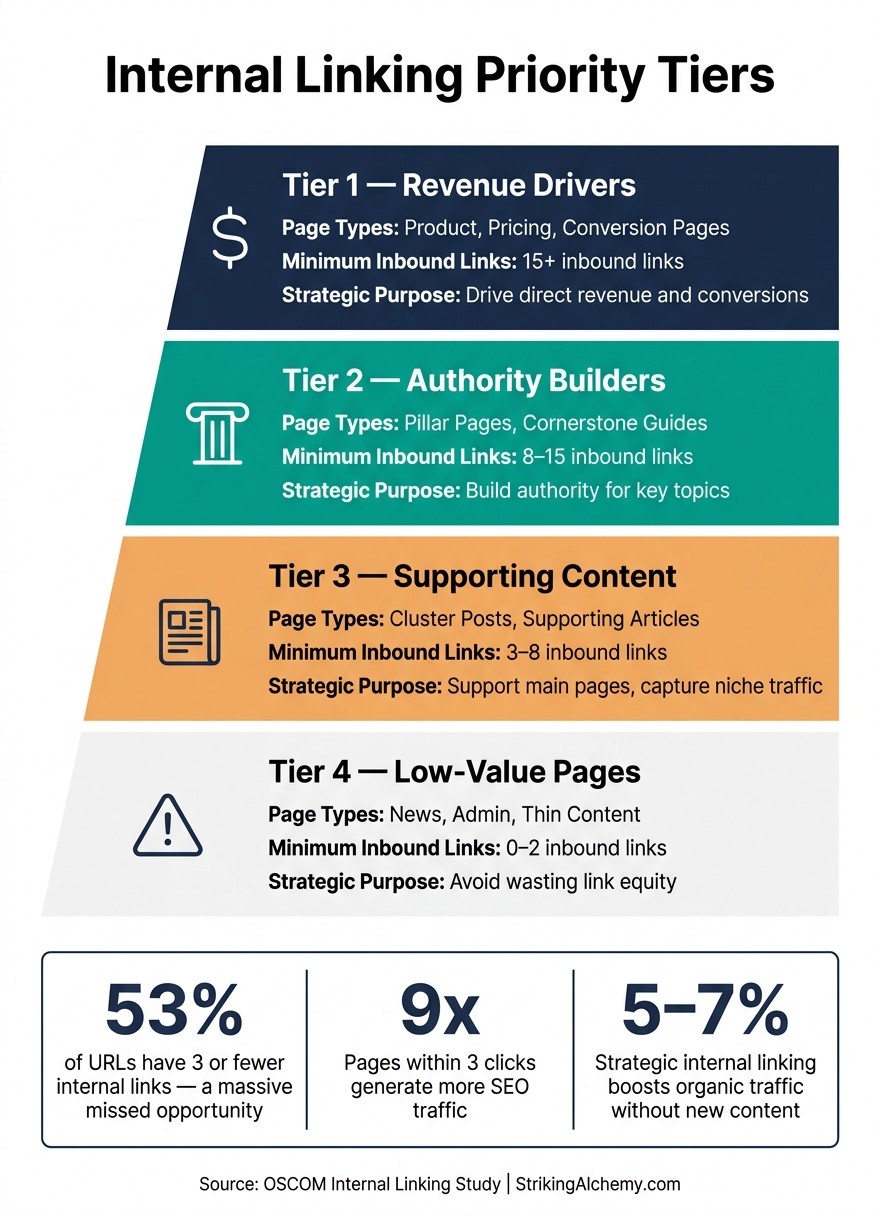
Internal Linking Priority Tiers: How to Distribute Link Equity Across Your Site
Internal linking isn’t just about connecting pages - it’s about aligning those connections with what your business actually needs. Most issues with internal links don’t come from technical errors but from a lack of strategy. Randomly placed links won’t help. Start by defining your business goals, and let those objectives shape every linking decision.
Map Core Pages and Conversion Goals
Your core pages are the heart of your site - the ones that directly impact revenue or lead generation. These include service pages, pricing details, demo forms, and landing pages. Ironically, these critical pages often get overlooked when it comes to internal linking.
Pinpointing these pages requires a mix of leadership input and SEO data. Use Google Search Console to identify pages with high impressions but low clicks. These "striking distance" pages (ranking between 5 and 15) are ripe for improvement. Adding 3–5 relevant internal links to these pages can boost their rankings in just a few weeks [8].
"Internal linking bridges the gap between content marketing and revenue." - OSCOM [8]
Once you’ve identified your core pages, the next step is to prioritize linking efforts based on these insights.
Turn Goals Into Link Priorities
Organize your pages into a priority system that reflects their importance to your business. A simple spreadsheet can help you categorize pages into tiers, ensuring every link serves a purpose:
Priority Tier | Page Type | Minimum Inbound Links | Strategic Purpose |
|---|---|---|---|
Tier 1 | Product, pricing, conversion pages | 15+ inbound links | Drive direct revenue and conversions |
Tier 2 | Pillar pages, cornerstone guides | 8–15 inbound links | Build authority for key topics |
Tier 3 | Cluster posts, supporting content | 3–8 inbound links | Support main pages and capture niche traffic |
Tier 4 | News, admin, or thin content | 0–2 inbound links | Avoid wasting link equity on low-value pages |
This system keeps your most important pages from being starved of link equity. A study of 23 million internal links revealed that 53% of URLs had three or fewer links pointing to them [9]. That’s a lot of missed opportunities.
The tiered approach also mirrors how customers move through the buyer’s journey. Top-of-funnel blog posts should link to mid-funnel pages, like service comparisons, which then lead to bottom-of-funnel conversion pages. Every link should guide both readers and search crawlers toward your business goals.
Why It Matters: A well-planned internal linking strategy can increase organic traffic by 5–7% - without creating new content or earning external backlinks [9]. It’s a simple, cost-effective way to get more out of your existing site.
Build a Linking Structure That Works for Users
A well-organized site structure helps visitors navigate easily and shows search engines how your content connects. Without it, even your standout blog posts can become traffic dead ends - users leave without exploring the pages that drive your business forward.
Plan a Clear Content and URL Structure
Picture your site as a pyramid: the homepage sits at the top, followed by broad pillar pages, and then detailed cluster posts underneath - all linking together logically.
What matters most is click depth, not how long your URLs are. A page buried under /blog/category/subcategory/post/ can still rank well if it’s only two clicks away from the homepage. In fact, pages accessible within three clicks generate nine times more SEO traffic [12]. Prioritize making Tier 1 pages - like pricing or demo pages - reachable in three clicks or less. Keep URL structures shallow (no more than 2–3 levels), use hyphens for clarity, and ensure the path clearly reflects the page’s purpose.
"Your URLs should mirror your site hierarchy. When a user or crawler reads a URL, they should immediately understand where the page sits in your structure and what it's about." - VJ SEO Marketing [15]
Once your URL hierarchy is in place, the next step is grouping content in a way that makes sense. A clear structure sets the foundation for building topic clusters, which can amplify both user engagement and search performance.
Build Topic Clusters Around Core Pages
A topic cluster connects related content to a central pillar page. The pillar page tackles a broad subject in detail - usually 2,500 to 5,000 words - while 8 to 12 supporting cluster articles dive into specific subtopics. These articles and the pillar page link back and forth, creating a closed authority loop that strengthens your site’s topical authority [12][13].
HubSpot's adoption of the pillar-and-cluster model is a prime example: their Domain Authority jumped from 49 to 60, and clicks on target keywords increased by 500% [12][8]. Atilla Kuruk, an SEO and AI Search Specialist, explains:
"A small website with two well-structured content clusters will consistently outperform a large site with hundreds of scattered, unlinked articles." [13]
Clusters don’t just boost traffic - they also extend the lifespan of your rankings. Organized clusters generate about 30% more organic traffic than standalone posts and maintain those rankings 2.5 times longer [12]. If you’re working with a tight content budget, this approach ensures every piece you create supports your core pages, rather than standing alone.
Additionally, a coherent cluster structure improves Google’s ability to crawl your site and enhances visibility in AI-generated search results by 30–40% [14]. Over time, these benefits can snowball into a significant competitive advantage.
How to Add Internal Links to Blog Posts
Once your blog structure is organized and your linking priorities are clear, it’s time to dive in and add internal links directly into your posts. This involves fixing broken links, addressing missing connections, and inserting links where they’ll have the most impact.
Find and Fix Broken or Missing Links
Start by auditing your site using tools like Screaming Frog SEO Spider (free for up to 500 URLs; $259/year for unlimited crawls) or Google Search Console. These tools can help you spot broken links by filtering for 4xx status codes. Also, look for orphaned pages - those with no internal links - by sorting the crawler report by "Inlinks" count. Orphaned pages are often overlooked by search engines, so adding 2–3 contextual links from relevant posts can make a big difference. Pages with five or more quality internal links tend to rank 43% higher than those with fewer [16][17][18][19][20].
Redirect chains are another common issue. When a link points to a page that redirects multiple times (A → B → C), it reduces link equity by 15–20% with each hop. Fix this by updating the original link to point directly to the final destination. Aim to run this type of audit every quarter, or monthly if you’re publishing frequently.
Issue Type | How to Identify It | Recommended Fix |
|---|---|---|
Broken Link | Filter crawler by 4xx status codes | |
Orphaned Page | Sort by "Inlinks" (count = 0) | |
Redirect Chain | Check crawler redirect reports | |
Deep Content | Sort by crawl depth (> 3 clicks) | Add links from the homepage or top-level category pages [18][20] |
Fixing these issues clears the way for more effective internal linking.
Place Contextual Links Inside Blog Content
Contextual links - those embedded naturally within the body of your blog posts - are some of the most powerful tools for boosting authority [11]. Place your most important link (usually pointing to a core page) early in the post, then weave in supporting links throughout the content. For posts between 1,000–2,000 words, aim for 10–20 internal links; for longer articles, 20–40 links is a good range [21]. However, keep the total number of links on any page, including navigation and footer links, under 150 to maintain their value [21].
The impact of strategic internal linking can be dramatic. Organic traffic can increase by as much as 47% within 90 days - without adding new content or external backlinks [14].
"Internal linking is the engineering of authority flow. Every link is a decision about where you want ranking power to go." - Selim Reggabi, SEO Architect [11]
Use Navigation and Layout to Support Key Pages
Your site’s navigation also plays a crucial role in internal linking. Use the header navigation for top-level categories and core pillar pages. Keeping it focused ensures each link retains its authority [4][23].
Enable breadcrumbs across your site to help users and search engines navigate your content hierarchy. Breadcrumbs not only improve user experience but also make your content easier to crawl. For example, one case study found that adding breadcrumbs to a 280-article blog eliminated orphaned pages and improved pillar page rankings from an average position of 11.9 to 7.3 in just nine weeks [4].
Adding a related content module at the bottom of blog posts can also help. A curated list of three related articles encourages readers to explore more of your site while directing them toward key pages. Since pages more than three clicks away from the homepage are crawled 50% less frequently [7], these elements make your important content more accessible.
Why It Matters: Pages that are hard to reach are harder to rank. Fixing broken links, addressing orphaned content, and adding internal links strategically can transform your blog from a collection of isolated posts into a network that channels authority to the pages that matter most.
Write Anchor Text That Works for Users and Search Engines
Anchor text should make it obvious where the link leads, both for users and search engines. Once you’ve built a solid internal linking system, refining your anchor text is the next step to get the most out of those links.
Write Anchor Text That Describes the Destination
Your anchor text needs to communicate relevance. Avoid vague phrases like "click here", "read more", or "this post." Instead, use 2–5 words that capture the core topic of the destination page [22][7]. Google’s guidance is straightforward:
"Good anchor text is descriptive, reasonably concise, and relevant to the page that it's on and to the page it links to." - Google Search Central [24]
This isn’t just theory. After Google’s 2024 Helpful Content Update, sites with descriptive, natural anchor text saw 18% better rankings compared to those using generic links [7]. A quick win? Audit the ten pages you link to most often and replace every "learn more" with something specific, like "how to build a content calendar."
Avoid mismatched anchors. If your link text says "website speed tips" but the page is about Framer migrations, you’re setting up confusion for both users and search engines. Always ensure the anchor text aligns with the content of the destination page [10].
Weak Anchor Text | Strong Anchor Text |
|---|---|
"Click here to learn more" | "How to build a content calendar" [7] |
"This post" | "Our guide to keyword research" [7] |
"Marketing" | "Effective email marketing strategies for small businesses" [5] |
Once you’ve nailed down accurate and descriptive anchors, your next step is to introduce variety to better support search engine context.
Mix Keywords With Natural Variation
Using the same anchor text repeatedly for a single page can backfire. If over 70% of your links to a page are identical, it can hurt rankings [3]. Why? It looks manipulative and limits the context search engines can gather.
"If you keep using the same anchor, you're giving Google one signal repeated 80 times. If you vary the anchor, you're giving Google 80 facets of context." - John Mueller, Senior Search Analyst, Google [3]
A good rule of thumb is the "15-40-35" rule: aim for 15–25% exact match, 30–40% partial match, and 25–35% semantic variations [6]. For instance, if you’re linking to a page about SEO audits, you might use "SEO audit" in one post, "technical SEO audit checklist" in another, and "improving site health" somewhere else. Top-performing sites typically use 4–8 distinct anchor text variations for their key pages [3]. Keeping a spreadsheet of these variations can help your team stay consistent without overthinking.
One more tip: place your most critical internal link within the first 30% of the content [3]. AI tools like ChatGPT and Perplexity interpret anchor text alongside the surrounding sentences. Links placed early in an article are more likely to be featured in AI-generated answers, which is becoming increasingly important.
Why It Matters: Descriptive and varied anchor text doesn’t just improve your rankings - it influences how AI systems interpret your content. A well-structured internal linking strategy with clear, semantic anchors can boost your visibility in AI-generated answers by 30–40% [14]. By diversifying your anchor text, you strengthen your site’s authority and reach.
Keep Your Internal Linking System Running Over Time
Getting your internal linking right once isn’t the finish line - it’s just the start. As you add new content, links can break, pages get buried, and your structure starts to crumble. A solid maintenance plan keeps everything running smoothly without creating more work than necessary. Here’s how to stay on top of it.
Set Rules for Link Quality and Maintenance
Schedule regular technical audits. Every 4–6 weeks, run a check for broken links and redirect chains. These issues affect nearly half of all websites (42.5%) [5].
"The best internal linking practices give you a repeatable system to boost rankings, improve crawlability, and move link equity to the pages that matter most." - Clayton Johnson, SEO Strategist [5]
Tools like Screaming Frog (free for smaller sites, ~$259/year for unlimited crawls) and Semrush Site Audit (starting at $129/month) can map your site structure and flag issues like pages buried too deep (more than three clicks from the homepage) [5].
Keep internal links focused. Pages overloaded with 50+ internal links tend to perform worse [5]. Stick to 5–10 contextual links for every 2,000 words to keep things effective.
Why It Matters: Every broken link is a missed chance to pass authority to a key page. Fixing these links is one of the easiest ways to improve SEO without creating new content.
Create a Repeatable Linking Process for New Content
A one-page playbook can make sure your internal linking stays consistent as you publish new posts.
Here’s what to include:
Link new posts from high-authority pages. Each new post should get links from 2–3 existing pages that already rank well [1].
Link back to older content. Make sure every new post includes links to relevant older articles and at least one core page.
Use an anchor registry. Track approved anchor text variations for your key URLs to avoid inconsistencies [2].
An audit of 97 live Framer sites in 2026 found that 94% had poor internal linking, relying on main navigation instead of in-body links [27]. A documented process ensures your site doesn’t fall into the same trap.
To simplify the process, advanced tools can take some of the manual effort off your plate.
Simplify Link Management with Framer
Framer is designed to make internal linking easier, especially as your content grows. If you’re on a paid plan, Framer automatically updates your sitemap.xml every time you publish new content [28]. This means search engines can find your new links right away - no manual uploads needed.
For scaling, Framer’s CMS Collection Lists let you create "Related Articles" sections that update automatically. Filter by category, and every new post will show relevant content without you lifting a finger [26].
"Internal linking is arguably the best SEO hack out there. It's low effort and high reward." - Luca Da Corte, Framer Expert [25]
Framer’s pricing grows with your needs:
Basic Plan ($10/month): Up to 1,000 CMS items
Pro Plan ($30/month): Up to 2,500 items, plus staging and redirects
Scale Plan ($100/month): For 10,000+ items [26]
For most small businesses, the Pro plan is ideal. It’s affordable and offers all the tools you need to maintain a clean, effective internal linking system.
Why Trust Striking Alchemy
Striking Alchemy is a web design and SEO studio based in Cranberry Township, PA. Led by Nick Kosanovich, who has over 20 years of experience, the studio focuses exclusively on Framer, offering custom designs, platform migrations, and SEO+GEO strategies to optimize for both Google and AI-driven search engines like ChatGPT and Perplexity.
Conclusion
Internal linking is like a growing web that strengthens with every new post, updated link, and connection to your key revenue-driving pages. Your blog content already carries authority - make sure that authority flows where it matters most: to your service pages, conversion points, and high-value content. Avoid letting it get lost in dead ends or isolated posts. By directing this flow of link equity, you can boost rankings and fuel growth.
"Internal links are how nutrients - in SEO terms, link equity and topical relevance - flow from the roots through the trunk to the branches and out to the leaves." - Dennis Yu, CEO, BlitzMetrics [10]
The strategies outlined here - mapping core pages, creating topic clusters, using clear anchor text, and keeping a tidy link structure - work together to strengthen your site's authority and improve SEO. These steps don’t demand a huge budget, just consistency and a clear plan.
FAQs
Which pages should I link to most?
To make your site work harder for you, focus on linking to core pages - like pillar pages, key resources, or high-conversion pages such as product or service pages. These links don’t just guide visitors; they build authority, spread link equity, and support your business goals. Place internal links in relevant content, especially near sections where action is encouraged, to emphasize their importance. If you have high-authority pages, use them strategically by linking to newer or underperforming pages to improve their visibility and rankings.
How many internal links should a blog post include?
A good rule of thumb for blog posts is to include 3 to 5 internal links per 1,000 words. This balance keeps the content relevant, boosts SEO, and ensures readers can easily navigate your site. Prioritize linking to important pages that align with your goals and improve the overall flow of your site.
How do I avoid over-optimizing anchor text?
To keep your anchor text strategy balanced, aim for natural and varied phrasing that aligns with the content of the linked page. Stick to using exact-match keywords for only about 15-30% of your internal links. For the rest, mix things up with partial matches, related terms, or branded phrases. Avoid repeating the same anchor text across different links or overloading with keywords. Instead, prioritize short, contextually relevant anchors that make sense to users and help search engines understand your content better.