

Choosing between Framer and WordPress in 2026 comes down to your priorities.
Framer: Best for brands seeking fast, visually stunning websites with minimal maintenance. Perfect for startups, agencies, and SaaS companies prioritizing speed, design, and ease of use.
WordPress: Ideal for large, content-heavy sites or businesses needing advanced customization, scalability, and control over hosting and backend systems.
Key Points to Consider:
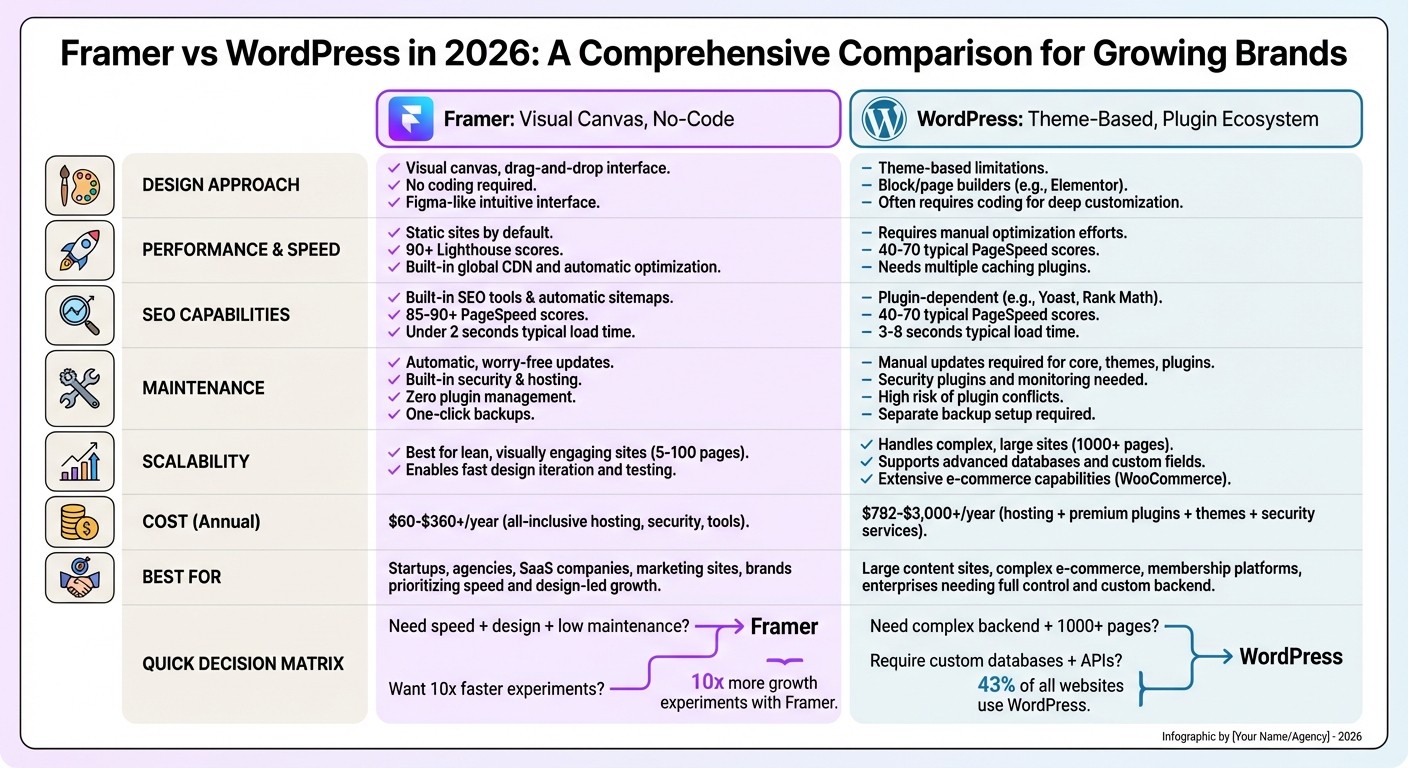
Design: Framer offers a drag-and-drop, no-code editor for pixel-perfect designs and animations. WordPress requires themes, plugins, and sometimes coding for unique layouts.
Performance: Framer delivers fast, static sites with minimal effort. WordPress can match performance but needs plugins, hosting upgrades, and regular maintenance.
SEO: Framer provides built-in tools for basic SEO needs, while WordPress supports advanced SEO customization with plugins like Yoast or Rank Math.
Maintenance: Framer handles hosting, updates, and security automatically. WordPress demands manual updates, plugin management, and troubleshooting.
Scalability: Framer excels for lean, visually engaging sites. WordPress is better for large-scale operations with complex data structures or e-commerce needs.
Quick Comparison Table:
Feature | Framer | WordPress |
|---|---|---|
Design Approach | Visual canvas, no coding | Theme-based, coding often needed |
Performance | Static, fast by default | Optimizations required |
SEO | Built-in tools | Advanced with plugins |
Maintenance | Automatic | Manual |
Scalability | Best for simple, sleek sites | Handles complex, large-scale sites |
Cost | $5–$30+/month | $782–$3,000+/year |
For most growing brands focused on speed, design, and simplicity, Framer is the better choice. If you need deep customization or manage a large, content-heavy site, WordPress remains unmatched in flexibility.
Framer vs WordPress 2026: Complete Feature Comparison for Growing Brands
What Is Framer?
Framer is a no-code website platform that seamlessly combines design, hosting, and content management into a single solution. Unlike traditional website builders that require you to turn design mockups into code, Framer's visual canvas is the actual website. This means what you design is exactly what visitors will see when they land on your site [2].
Built on React and utilizing server-side rendering, Framer ensures fast load times and excellent Core Web Vitals performance - all without requiring extra technical effort. The platform offers built-in hosting, automatic security updates, a simple CMS for blogs and portfolios, and automated sitemaps. You can even import your Figma designs directly into Framer, making it easy to bring your ideas to life. This all-in-one approach simplifies the process of creating and managing a website.
"Framer removes that gap [between design and development]. It is a 'What You See Is What You Get' canvas. It allows us to build stunning, animation-heavy, immersive websites incredibly fast."
– Ryan Farrow, Creative Director, SourceCodeCreative [2]
Pricing starts at just $5 per month for basic plans, with a free tier available for those who want to test the platform. For growing brands, Framer eliminates the need for multiple vendors, speeds up launches, and removes the hassle of managing IT tasks like updates and security.
Framer's Main Features
Framer’s drag-and-drop editor allows designers to create pixel-perfect, production-ready layouts without any coding. You can easily build complex designs, tweak spacing, and fine-tune typography - all through an intuitive interface.
The platform also shines when it comes to no-code animations. Features like scroll-triggered effects, hover states, and smooth transitions are accessible through simple toggles. This means you can create interactive, engaging experiences without needing custom JavaScript. Plus, Framer generates clean, semantic HTML and avoids unnecessary code, ensuring your pages load quickly and efficiently. These tools make it a go-to option for brands that want visually stunning websites with minimal development time.
Who Should Use Framer?
Framer is perfect for brands where visual design plays a key role in growth. Startups, creative agencies, and SaaS companies experimenting with landing pages can benefit from its rapid deployment capabilities.
For example, in January 2026, Daily Body Coach - a premium fitness concierge service - built their entire website on Framer within a month. The site’s custom animations and booking integrations helped the brand achieve over 100% growth [1]. Similarly, The Nations, a leading YouTube music channel, used Framer to secure the #1 spot on Google in their niche within a month of launch. This switch doubled their artist submissions compared to their previous platform [1].
While Framer is ideal for creating visually impactful sites quickly, it’s not suited for complex e-commerce stores with thousands of products or membership platforms requiring advanced database management. However, for brands focused on low-maintenance websites with a strong visual presence, Framer provides the tools needed to compete effectively without requiring a massive budget.
What Is WordPress?
WordPress is an open-source content management system that, as of early 2026, powers around 43% of all websites on the internet [5]. Unlike all-in-one platforms, WordPress offers its core software for free, allowing users to choose their own hosting, themes, and plugins. This setup gives you full ownership of your content and database, putting you in control of your site’s infrastructure and data [9][5].
The platform is built around a modular system where functionality is added through plugins and themes. With over 60,000 plugins and 8,000 themes available [5], WordPress can be customized for a variety of purposes - whether it’s a blog, an e-commerce store, or a multi-user platform. It’s especially effective for handling advanced content structures like custom post types, taxonomies, and multi-user roles (e.g., Administrator, Editor, Author, Contributor) [9][5]. Recent updates have introduced AI-assisted design tools and block-based editing, making visual layout adjustments easier while retaining flexibility [9]. This adaptability has made WordPress a go-to choice for scaling brands, though it does come with its own challenges.
That flexibility, however, isn’t without costs. While the core software is free, running a professional site can range from $782 to over $3,000 annually. This includes hosting ($60–$300+ per year), premium plugins like Elementor Pro (~$59/year) or Yoast Premium (~$99/year), and security tools like Sucuri (~$199/year) [5]. Additionally, WordPress requires regular technical maintenance, which many businesses underestimate. This mix of versatility and complexity defines the platform’s appeal and its challenges.
"WordPress is not the easiest platform. It is the platform that stays useful the longest."
– Harish Malhi, Founder, Goodspeed [9]
WordPress's Main Features
The plugin ecosystem is one of WordPress’s standout features - and also one of its most complex. Need advanced SEO? Add Rank Math or Yoast. Want to set up an online store? Install WooCommerce. Interested in email marketing integration? There’s a plugin for that too. This modularity means you can build nearly anything, from a personal blog to an enterprise-level platform capable of handling millions of visitors [7].
WordPress also excels in content management. It supports custom taxonomies, enables intricate author workflows, and can organize thousands of posts with ease. The modern Site Editor and block-based themes make visual customization more accessible and adaptable compared to older page builders [9]. These tools are especially valuable for brands managing frequent content updates or working with multiple contributors.
Another major advantage is ownership and portability. As a self-hosted, open-source platform, WordPress doesn’t lock you into a proprietary system. If your hosting provider becomes too expensive or your needs evolve, you can migrate your entire site without losing functionality [9][5].
Still, WordPress’s strengths come with certain hurdles.
WordPress's Common Problems
One of the biggest challenges with WordPress is the ongoing maintenance it requires. Regular updates for the core software, themes, and plugins are necessary to avoid security vulnerabilities and performance issues [9]. Failing to update can leave your site exposed to hackers, who often target outdated plugins and weak passwords [9].
Another issue is the reliance on multiple plugins, which can lead to what’s often called “plugin hell.” Many sites depend on a dozen or more third-party tools just for basic functionality. If a problem arises, you may find yourself troubleshooting by deactivating plugins one by one to identify the issue [11]. This reliance not only increases security risks but can also cause compatibility problems and slow down your site.
"Most WordPress disasters come from unclear choices, not from WordPress itself. People install a heavy theme, add fifteen plugins, then blame the CMS."
– Harish Malhi, Founder, Goodspeed [9]
Performance is another frequent concern. Using too many plugins or non-optimized themes can slow down your site, negatively affecting SEO rankings and conversion rates [6]. Achieving optimal performance requires effort, such as setting up caching, compressing images, and optimizing databases.
For instance, in January 2026, Zen Educate, a Series B-backed edtech platform, moved away from WordPress to reduce delays caused by its developer-heavy environment. The switch allowed their marketing team to run ten times more growth experiments and double their iteration speed [1]. For brands without dedicated technical resources, WordPress’s maintenance requirements can become a bottleneck, especially when speed is critical.
Design Flexibility Comparison
Framer and WordPress approach design in fundamentally different ways, and this distinction can significantly influence how brands create and maintain their online presence. Framer functions as a freeform visual canvas - similar to Figma - where designs can go live without needing developer intervention. WordPress, on the other hand, relies on a theme-based structure, often requiring work within predefined blocks. For brands aiming to stand out visually, these differences can impact both the speed of execution and the overall design flexibility. Let’s take a closer look at how each platform handles design.
How Framer Handles Design
Framer’s philosophy is straightforward: what you see is what gets published. It offers precise control over every design element, letting you drag, resize, and position components exactly as you envision them. Designers can take their creations live directly from the canvas without needing a developer [2].
Framer truly shines when it comes to high-fidelity animations and interactive effects. Motion is a core feature, with built-in tools allowing for smooth transitions and micro-interactions - all without writing any code. It also supports component-based design, enabling reusable elements like buttons or headers that stay consistent across your site.
However, there’s a trade-off: Framer doesn’t allow code export. You’re tied to their hosting platform. For brands prioritizing speed and visual polish, though, this limitation might be worth it.
How WordPress Handles Design
WordPress takes a more structured approach, starting with a theme - whether free or premium - that you can customize using the block editor (Gutenberg) or third-party tools like Elementor or Divi. While this setup offers flexibility, it often means working within the boundaries of the chosen theme. Achieving unique layouts may require custom CSS, PHP, or hiring a developer.
Animations in WordPress are not natively supported and typically rely on third-party plugins or custom code.
Where WordPress excels is in its ability to handle extensive customization. If you need a highly tailored design or complex features like searchable directories or membership portals, WordPress provides the tools to build it. That said, such customization often demands a bigger budget, longer development time, and ongoing technical upkeep.
Feature | Framer | WordPress |
|---|---|---|
Design Approach | Freeform visual canvas (Figma-like) | Theme-based with block/page builders |
Coding Requirement | Minimal to none for design/animation | Often required for deep customization |
Animations | Built-in, high-fidelity, no-code | Requires plugins or custom JS/CSS |
Design Fidelity | "What you see is what ships" | Can drift during build/handoff |
Maintenance | Managed by platform | Manual updates for core, plugins, and themes |
For brands, the decision often boils down to priorities: Framer is ideal for quickly launching polished, animation-heavy pages, while WordPress is better suited for those needing advanced customization and flexibility, albeit with higher technical demands.
Performance and Speed Comparison
Speed is a critical factor for user engagement, SEO, and conversions. With Google's Core Web Vitals still a key ranking factor in 2026, ensuring top-notch performance is crucial for growth. Framer and WordPress handle speed differently, and understanding their approaches can help you decide which platform aligns best with your needs.
Framer's Performance
Framer sites are designed to be static by default, giving them a significant edge in loading speed compared to dynamic setups. This static nature eliminates the need for extra configuration, like caching plugins or CDNs. Framer also comes with built-in performance optimizations such as server-side rendering, native image compression, and lazy loading [4]. These features ensure that even users without technical expertise can achieve fast-loading websites.
"Framer sites are static by default, meaning they load faster than most WordPress setups without needing caching plugins or CDN configuration. Speed matters for SEO and conversions." – Harish Malhi, Founder, Goodspeed [1]
Framer consistently delivers Lighthouse performance scores of 90+ without requiring external tools [4]. A great example is Zen Educate, an edtech platform that switched to Framer in January 2026. They reported twice the iteration speed and eliminated delays caused by performance optimization cycles [1].
While excessive animations can sometimes slow down Framer sites [13], the platform's native optimizations generally ensure strong performance for most brands without needing advanced technical skills.
WordPress's Performance
WordPress, on the other hand, requires more manual effort to achieve comparable speed. While it’s possible to create fast-loading WordPress sites, they rarely perform at their best without additional tools like caching plugins (e.g., WP Rocket, W3 Total Cache), image compression software (e.g., ShortPixel, Smush), and CDN configurations [1][13].
The platform’s flexibility can sometimes work against it. Adding plugins and using certain themes can introduce unnecessary code, leading to bloated pages and slower load times [15]. Even with optimizations, maintaining high performance demands ongoing effort - regular updates, load time monitoring, and resolving plugin conflicts.
For WordPress users, choosing performance-focused page builders like Breakdance, which includes features like lazy loading and clean code, can help boost speed [12]. Additionally, investing in premium hosting is critical since server quality directly impacts Core Web Vitals [14].
Performance Aspect | Framer | WordPress |
|---|---|---|
Out-of-the-Box Speed | Static sites load fast by default | Requires custom optimizations |
Optimization Tools | Built-in (server-side rendering, CDN, etc.) | Relies on third-party plugins and tools |
Lighthouse Scores | 90+ without plugins | Variable; depends on theme/plugin quality |
Maintenance | Minimal, no ongoing tuning required | Requires regular updates and monitoring |
Code Quality | Clean, static rendering | Can become bloated with themes and plugins |
Framer stands out for its simplicity and speed, making it ideal for brands that prioritize rapid launches and consistent performance without the technical overhead. While WordPress offers unmatched customizability, achieving similar performance levels often requires technical know-how, additional tools, and a commitment to regular maintenance.
SEO Capabilities Comparison
SEO plays a critical role in helping brands grow. Without strong visibility in search results, even the most visually stunning website can struggle to attract traffic. Once you’ve optimized speed and performance, SEO becomes essential for driving that visibility. Framer and WordPress approach SEO in very different ways - one focuses on simplicity and speed, while the other offers extensive customization through plugins.
Framer's SEO Tools
Framer simplifies SEO with built-in tools that require little to no setup. It automatically generates sitemaps, robots.txt files, and meta tags, while leveraging server-side rendering (SSR) to ensure search engines can efficiently crawl your site’s content [4]. Framer’s technical SEO performance is a standout feature, with sites often achieving PageSpeed scores of 85+ and loading in under two seconds [16].
"WordPress gives you the most control over SEO with its deep customizability... all the right things will be in the right places with Framer for SEO, and the site will be incredibly quick without you having to do any setting tweaks." – Connor Walberg, SEO Specialist [8]
For growing brands, Framer includes 301 redirect management within its Pro plans and above, supporting wildcard patterns and capture groups [16]. It also offers built-in 30-day analytics that respect user privacy, eliminating the need for external tracking scripts that can slow down page performance [10].
However, Framer's simplicity comes with trade-offs. Advanced structured data and schema markup must be configured manually, making it less suitable for complex SEO needs like detailed product schemas or extensive author archives [7][16]. Additionally, its flatter CMS model may feel limiting for brands managing large content libraries (500+ posts) or intricate taxonomy setups compared to WordPress’s robust category and tagging systems [16].
WordPress's SEO Tools
WordPress takes a more flexible, plugin-driven approach to SEO. Tools like Yoast SEO and Rank Math handle everything from meta tags to sitemaps, giving users fine-grained control over every aspect of their SEO strategy. This makes WordPress a go-to choice for content-heavy sites and e-commerce platforms that need detailed structured data [3][10].
WordPress shines in managing complex content structures and offers advanced SEO features like automated schema markup and content analysis through plugins. However, this flexibility can come at a cost - plugin overhead often slows down load times, with typical WordPress sites scoring between 40 and 70 on PageSpeed and taking 3–8 seconds to load [16]. To match Framer’s performance, users often need to invest in manual optimizations, high-quality hosting, caching plugins, and ongoing maintenance [10].
Another consideration is cost. While WordPress itself is free, premium SEO plugins can range from $50 to over $200 annually, on top of hosting fees. In contrast, Framer includes its SEO tools in subscription plans priced between $5 and $30+ per month [7][16].
Here’s a quick comparison of the two platforms’ SEO features:
SEO Feature | Framer | WordPress |
|---|---|---|
Setup Complexity | Automatic - no configuration needed | Requires plugin installation and setup |
Page Speed | 85–90+ PageSpeed scores; under 2 seconds | 40–70 scores; 3–8 seconds without optimization |
Structured Data | Basic support; manual setup required | Advanced automation via plugins |
Redirect Management | Built-in for Pro plans | Requires plugins or server configuration |
Content Scale | Best for lean sites and smaller blogs | Ideal for 500+ posts and complex taxonomies |
Cost | Included in $5–$30+/month plans | Free core; premium plugins $50–$200+/year |
For brands prioritizing speed and ease of use, Framer offers excellent SEO performance without requiring deep technical expertise. On the other hand, WordPress is better suited for large, content-heavy sites that demand advanced features and greater customization. If you’re migrating from WordPress to Framer, make sure to use a redirect map to preserve your search rankings by 301-redirecting old URLs to new ones [16]. These SEO tools are integral to improving search visibility, a key driver for any growing brand.
Ease of Use and Maintenance Comparison
Managing a website shouldn't pull your focus away from growing your business. However, the time and effort spent on upkeep can vary significantly depending on the platform you choose. Framer and WordPress both deliver results, but the level of technical involvement they require is vastly different. Let’s break down how WordPress demands more hands-on maintenance compared to Framer.
Framer's Maintenance Requirements
Framer simplifies website management by acting as an all-in-one solution. Hosting, security, and updates are all handled automatically in the background. You won’t need to worry about tasks like applying security patches, optimizing databases, or troubleshooting plugin conflicts. Framer takes care of the infrastructure, leaving you free to focus on creating content and testing growth strategies [1].
"No plugins to update, no security patches to worry about, no database to optimize. Framer handles hosting and infrastructure so you can focus on your business." – Harish Malhi, Founder, Goodspeed [1]
For instance, Daily Body Coach managed to scale quickly using Framer without needing a dedicated maintenance team [1]. However, this convenience comes with a trade-off: vendor lock-in. Since Framer manages hosting and infrastructure, switching providers or implementing custom performance tweaks isn’t as flexible as it is with WordPress.
WordPress's Maintenance Requirements
WordPress, on the other hand, requires a more hands-on approach. Updates for core software, themes, and plugins need to be applied manually, often on a weekly or monthly schedule. These updates can sometimes lead to plugin conflicts that require technical troubleshooting. Beyond updates, users must also manage hosting, domains, SSL certificates, and security patches themselves.
Despite WordPress’s popularity, its extensive use doesn’t reduce the maintenance burden. Backups often require additional plugins or services, and optimizing performance involves manual work, such as configuring caching and compressing images.
"WordPress was cheap and flexible, but honestly, it came with more maintenance than I was comfortable with." – Widya Bayu W, Co-founder, Velox Themes [10]
Here’s a quick comparison of the maintenance tasks for each platform:
Maintenance Task | Framer | WordPress |
|---|---|---|
Initial Setup | Instant (all-in-one) | Manual; requires separate hosting/domain |
Updates | Automatic | Manual (Plugins, Themes, Core) |
Security | Built-in; continuous monitoring | User-managed; requires security plugins |
Backups | Integrated (one-click rollbacks) | Requires separate setup/plugins |
Plugin Conflicts | Non-existent (no third-party plugins) | High risk during updates |
For businesses looking for a low-maintenance, "set it and forget it" approach, Framer provides a streamlined solution. On the other hand, WordPress is ideal for those with access to developer resources or a need for complete control over hosting and performance. While WordPress offers flexibility, it comes with a heavier maintenance load. Reducing maintenance demands not only saves time but also allows teams to focus on strategic initiatives and growth.
Scalability for Growing Brands
A small five-page website today might need to handle hundreds of pages, thousands of visitors, and complex integrations tomorrow. Framer and WordPress approach scalability in very different ways, and understanding these differences can help you avoid expensive migrations later. Let’s take a closer look at how each platform supports growth.
How Framer Scales
Framer is built with speed and simplicity in mind. Its infrastructure, which uses static defaults and server-side rendering, consistently achieves Lighthouse scores of 90+ without requiring extra optimization. Hosting and infrastructure are fully managed by Framer, so you don’t have to worry about databases, security patches, or backend maintenance as your traffic grows.
For brands prioritizing rapid experimentation, Framer offers a clear advantage. Many companies have seen faster iteration cycles after switching to Framer, reducing weeks of developer work to just a few days. This makes it a great choice for teams that need to launch marketing pages or test ideas quickly.
That said, Framer does have its limits when it comes to scaling. It’s not designed to handle complex data structures like searchable databases with thousands of entries or intricate membership systems. As Ryan Farrow, Creative Director at SourceCodeCreative, explains:
"Framer is fantastic for content, but it isn't a database beast" [2]
For businesses that need both fast-loading marketing pages and advanced backend capabilities, a hybrid approach - using Framer for front-facing pages and other tools for data-heavy tasks - might work best.
How WordPress Scales
While Framer simplifies scalability for content-driven sites, WordPress provides the tools for handling large-scale, complex operations. With 43.4% of all websites running on WordPress [3], it’s clear the platform can manage substantial growth. Properly configured, WordPress can handle hundreds of millions of monthly page views, making it ideal for large blogs, intricate e-commerce platforms, and content-heavy websites. Its open-source nature allows for robust integrations with CRMs, custom APIs, and unique data structures that closed systems can’t accommodate.
However, this flexibility comes with added complexity. As your WordPress site grows, maintaining it can become a time-intensive task. Core updates, plugin management, and theme maintenance are essential, and optimizing performance requires manual effort - think caching, image compression, and server tuning. Without premium hosting and careful oversight of plugins, WordPress sites can become sluggish or bloated.
WordPress is the go-to platform for businesses needing advanced data management, extensive product catalogs, or complete control over their infrastructure. But success with WordPress at scale demands either a dedicated technical team or investment in managed hosting to ensure performance and security remain top-notch. Flexibility is abundant, but it comes with added responsibility.
Which Platform Is Better for Growing Brands?
The right platform depends on the type of growth you’re aiming for. If you’re a small or medium business prioritizing speed, sleek design, and minimal technical hassle, Framer stands out as the top choice in 2026. It’s tailored for brands that need to act fast, experiment often, and maintain a professional online presence - all without hiring developers or dealing with constant plugin updates. These strengths build on Framer's edge in design flexibility, performance, and low-maintenance requirements.
When it comes to backend complexity, however, the platforms take different paths. WordPress remains the go-to for businesses requiring robust backend systems. This includes content-heavy websites with thousands of articles, intricate membership structures, or e-commerce stores managing hundreds of products. But for most growing brands focused on marketing, landing pages, and conversion-driven designs, Framer delivers faster results with far less effort.
Performance data backs this up. Case studies show that brands migrating to Framer saw up to 10x more growth experiments and doubled their iteration speed, cutting development time significantly [1]. If your WordPress site is bogged down by sluggish performance or too many plugins, switching to Framer could be the game-changer your brand needs. Striking Alchemy specializes in helping brands transition from WordPress, Squarespace, and Wix to Framer, ensuring your SEO rankings remain intact while building a modern, hassle-free website.
Cost is another key factor. While managed WordPress sites typically cost between $1,382 and $3,182 per year, Framer offers an all-in-one solution starting at just $10/month [5]. This stark difference makes it easier for brands to choose a platform aligned with their growth goals.
Ultimately, your platform should match your future ambitions, not your past setup. For most growing brands in 2026, that means prioritizing speed, simplicity, and standout design over the complexities of technical management.
FAQs
How hard is it to migrate from WordPress to Framer?
Migrating from WordPress to Framer in 2026 can be a smooth process with careful preparation. Start by auditing your content to determine what needs to be transferred. Next, export the content from WordPress and convert it into formats compatible with Framer. Once that's done, import the content into Framer and update all internal links to ensure functionality.
One of the most critical aspects of the migration is setting up proper redirects to preserve your SEO rankings. This step helps prevent traffic losses and ensures search engines understand the new structure of your site. While technical challenges may pop up, Framer offers helpful resources to guide you through the process. Finally, thorough testing is essential to catch any issues and ensure your site runs seamlessly without negatively affecting SEO.
Will my SEO rankings drop if I switch platforms?
Switching from WordPress to Framer in 2026 doesn’t have to harm your SEO rankings - as long as it’s done the right way. The key lies in a smooth migration process. This includes setting up proper redirects, transferring all content accurately, preserving schemas, and sticking to SEO best practices throughout the transition.
Framer is built with speed and SEO in mind, which could even improve your rankings. However, skipping critical steps during the migration could lead to temporary ranking drops. To keep your SEO intact, careful planning and precise execution are absolutely essential.
Which platform is better for ecommerce at scale?
When it comes to large-scale ecommerce, WordPress often stands out as the better option. It’s equipped to manage extensive content libraries, handle complex workflows, and support highly customizable online stores through plugins like WooCommerce. With its ability to scale, WordPress can easily accommodate large product catalogs and intricate business operations.
In contrast, Framer is more suited for smaller, design-centric projects. Its native ecommerce features are limited, making it less ideal for businesses aiming to expand. For ecommerce businesses planning to grow, WordPress offers the tools and flexibility needed to support that growth effectively.