

Ecommerce SEO in 2026 is all about technical precision and user-focused design. Here’s what matters most for your category and product pages:
Crawl Efficiency: Use robots.txt and sitemaps to guide search engines to high-value pages and avoid wasting crawl budget on duplicate or low-priority URLs.
Site Architecture: Keep products within 3-4 clicks from the homepage to improve authority and crawlability.
Structured Data: Implement schema markup like
Product,BreadcrumbList, andAggregateRatingto boost visibility in search results and AI tools.Core Web Vitals: Focus on fast load times (LCP ≤ 2.5s), responsiveness (INP ≤ 200ms), and stable layouts (CLS ≤ 0.1).
Mobile Optimization: Prioritize mobile-first designs with fast, user-friendly templates that match desktop content.
AI Personalization: Leverage dynamic content and structured data to cater to AI-driven discovery tools and improve engagement.
Key takeaway: Optimize your templates for both traditional search engines and AI assistants by focusing on technical SEO, structured data, and mobile performance. This ensures your store stays visible, competitive, and profitable in an evolving ecommerce landscape.
Indexability and Crawl Efficiency for Templates
Inefficient crawling can directly impact your revenue. Google determines your site's crawl budget - the number of pages it crawls within a set timeframe - based on your server’s capacity (Crawl Rate Limit) and the relevance or freshness of your content (Crawl Demand) [8]. For smaller ecommerce sites, every wasted crawl on a low-value page is a missed chance to get a revenue-driving product indexed.
One of the biggest offenders? Faceted navigation. It can generate thousands of near-duplicate URLs, eating up your crawl budget. Take this example from 2026: an outdoor gear retailer with 50,000 products discovered that out of 200,000 daily crawl requests, 142,000 hit parameter URLs like ?color=blue&size=medium&sort=price. That’s 71% of their crawl capacity wasted.
"If Googlebot cannot find your product, your customer cannot buy it. It is that simple." - Jaydeep Haria [8]
Start by identifying what Google is actually crawling. Use the "Crawl Stats" report in Google Search Console. If over 10% of your requests result in 4xx errors or if response times exceed 500ms, you’ve got issues to address. Improving response times to under 200ms can boost crawl capacity by around 15%, while times above 500ms can severely limit it [9].
These challenges highlight the importance of refining technical elements like robots.txt files and sitemaps. Beyond speed, guiding crawlers to your high-value pages and keeping them away from low-priority ones is essential.
Optimizing Robots.txt and Sitemaps
Your robots.txt file acts as a gatekeeper for crawlers, while meta robots tags decide what content appears in search results [7]. Use robots.txt to block areas of your site that hold no SEO value, such as /cart, /checkout, /account, or internal search result pages. For parameters that create endless low-value variations (e.g., ?sort=price, ?sessionid=, or ?price_min=), block them from being crawled entirely [7].
A well-implemented strategy like this has been shown to increase impressions of high-value pages by 79.5% [8]. However, never block CSS or JavaScript files in robots.txt - Google needs these to render your ecommerce pages correctly [7].
Your XML sitemap is essentially a roadmap to your most important content. Include only canonical URLs and exclude pages with errors (404s, 5xxs) or noindex tags [3]. For large catalogs, split your sitemap into multiple files by category (e.g., "Shoes", "Accessories", "Outdoor Gear"). This makes diagnosing issues in Google Search Console much easier. Assign priority values wisely: 0.8–1.0 for your homepage and main categories, 0.5–0.7 for individual product pages. Don’t forget to declare your sitemap’s absolute URL in robots.txt using the Sitemap: directive [3]. Use trailing slashes (e.g., Disallow: /admin/) or wildcards (e.g., Disallow: /admin*) to block directories effectively [7].
Managing Crawl Budget for Large Ecommerce Sites
For sites with extensive catalogs, managing your crawl budget becomes a key advantage. A quick way to evaluate your performance is by dividing your total crawlable URLs by the "Average crawled per day" metric in Google Search Console. If this number exceeds 10, it’s time to optimize [13].
Focus on whitelisting filter combinations that align with actual search demand. For example, "men's waterproof hiking boots" likely has search volume, while "men's boots sorted by price low to high in blue size 10.5" does not [11]. Use noindex, follow for multi-faceted combinations that don’t match specific search intent. This approach allows bots to discover products without wasting crawl resources [10].
Server performance also plays a big role in crawl efficiency. If Search Console shows consistently slow response times, consider upgrading your hosting or using a content delivery network (CDN).
Metric | Healthy Range | Danger Zone | Impact on Budget |
|---|---|---|---|
Server Response Time | < 200ms | > 500ms | Critical: Slows crawl rate |
4xx Errors | < 2% of requests | > 10% of requests | High: Wastes resources on dead ends |
5xx Errors | 0% | Any recurrence | Severe: Causes Google to back off |
Duplicate URLs | Minimal | > 30% of inventory | High: Dilutes equity across variants |
For discontinued products, handle them strategically. Use 301 redirects to guide traffic to relevant parent categories if the page has backlinks or traffic. For permanently removed pages with no SEO value, a 410 status code is the way to go [8]. This prevents wasted crawl budget on outdated inventory.
Lastly, don’t overlook image optimization. Compress images and switch to modern formats like WebP or AVIF to reduce page weight and speed up crawling [3].
Site Architecture for Category and Product Templates
A well-planned site architecture is the backbone of both effective SEO and a smooth shopping experience. Think of it as the roadmap that distributes authority, directs search engine crawlers, and simplifies the customer journey.
The key idea here is straightforward: keep your most important pages close to the homepage. Every extra click between your homepage and a product page weakens authority and slows down discovery. For small to medium ecommerce businesses in 2026, the ideal setup is ensuring no product page is more than 3–4 clicks away from the homepage [5]. Once you exceed this range, pages tend to lose authority and are crawled less frequently.
"Architecture decisions made at 500 products either enable or prevent success at 50,000." - Deep in SEO & GEO [15]
As your product catalog expands, the stakes get higher. A structure that works for 500 products can buckle under the weight of 50,000. That’s why balancing flat and deep architectures through smart internal linking is critical for long-term growth.
Flat vs. Deep Site Structures
Flat site structures keep pages close to the homepage, usually within 1–3 clicks. This setup is fast for crawlers to index and spreads PageRank evenly across the site [14]. It’s especially effective for smaller catalogs, as it eliminates unnecessary layers between shoppers and products.
Deep site structures, on the other hand, rely on multiple levels - categories, subcategories, and further divisions - to organize large inventories. While this creates clear topical silos that search engines can recognize, it also risks burying products too far from the homepage. Pages that require more than four clicks to reach often rank poorly due to reduced crawl frequency and weaker authority [14][15].
For 2026, a shallow hierarchy with logical organization is the way to go. Keep categories clear and well-organized, but don’t let essential products sit more than 3–4 clicks away from the homepage [12][3]. This hybrid approach combines the crawl benefits of flat structures with the topical clarity of deeper ones.
Feature | Flat Architecture | Deep Architecture |
|---|---|---|
Click Depth | Shallow (1–3 clicks from homepage) | Deep (4+ levels of hierarchy) |
Best For | Small to medium sites (<500–1,000 pages) | Large catalogs (10,000+ products) |
Crawl Efficiency | High; faster indexation [14] | Lower; requires strategic optimization [14] |
Authority Flow | Evenly distributed [14] | Concentrated at category levels [14] |
User Experience | Simple navigation; less browsing effort | Better for discovery in complex taxonomies |
This streamlined structure also works better for mobile shoppers, who now account for over 75% of ecommerce traffic [5]. Complex, multi-level menus are tough to navigate on smaller screens, whereas flatter architectures are better suited to mobile-friendly designs like hamburger menus [14].
"Every product should be reachable in three clicks or fewer. Google and AI tools do not reward chaos. They reward technical clarity in structure." - Ivy Boyter, SEO Expert, FullThrottleSEO [5]
To evaluate your own architecture, use Google Search Console or crawl visualization tools to check click depth. If high-value products are buried beyond four clicks, you may need to flatten your structure or add shortcuts from high-authority pages - like your homepage or popular blog posts - to those deeper pages [14].
Internal Linking for Better Navigation
Internal linking transforms a static site structure into a dynamic network, guiding both crawlers and shoppers. The goal is twofold: distribute authority to revenue-driving pages and create intuitive pathways that reduce friction in the buying process.
Stick to a strict 3-click rule to ensure every critical product page is easily accessible from the homepage. Audit your site for orphaned pages - those not linked to your main navigation and invisible to crawlers [1]. Reconnect these pages by adding contextual links to relevant categories.
Contextual linking is more effective than generic navigation links. It passes more authority and aligns with user intent. For instance, instead of using “click here,” use descriptive anchor text like “waterproof hiking boots for men” to reinforce topical relevance. Aim for a mix of anchor text: 30% keyword-rich, 40% branded or product names, and 30% natural language [16]. These links strengthen your shallow hierarchy and elevate key product pages.
High-performing blog posts can act as authority hubs. For example, if a guide on "How to Choose Running Shoes" ranks well and attracts backlinks, use it to boost your running shoe category page by adding contextual links [1]. This strategy uses informational content to enhance the visibility of transactional pages.
Breadcrumb navigation is another powerful tool. It helps users orient themselves and provides search engines with semantic context through the BreadcrumbList schema [16]. Make sure breadcrumbs reflect your actual URL structure (e.g., Home > Men's > Shoes > Running).
Cross-linking through "Frequently Bought Together" or "Related Products" sections creates thematic connections across your catalog [1]. These links not only distribute authority but can also increase average order values by 15–25% by surfacing complementary products at the right time [16].
For faceted navigation, use canonical tags to point filtered pages (e.g., /shoes?color=blue&size=10) back to the main category URL (/shoes). This avoids diluting link equity across duplicate URLs while still allowing users to filter results [1][12]. Use noindex, follow for low-value filter combinations that don’t align with specific search intent, ensuring crawlers focus on your most important pages.
"Internal linking is one of the most underutilized SEO strategies in ecommerce... guiding existing visitors through a strategic path that increases their likelihood of making a purchase." - SellSuiteX [16]
Schema Markup for Products and Categories
Schema markup acts as a translator for your product data, making it easier for search engines to understand key details like price, stock status, and reviews. Without it, Google has to guess - and as Vijay Bhabhor, Technical SEO Architect, puts it:
"Schema Markup (Structured Data) is the translator between your database and Google's index. Without it, Google has to guess your price, stock status, and reviews. Google hates guessing." - Vijay Bhabhor [18]
By implementing structured data, you can improve your organic click-through rates (CTR) significantly. For instance, product-rich results can boost CTR by 30% compared to standard listings [17]. Rakuten Recipe saw a 2.7x increase in traffic after adopting rich results [19]. Considering that organic search drives 33% of ecommerce traffic [1], schema markup is a critical tool for staying competitive in search rankings.
Beyond improving CTR, schema also ensures your product data aligns with Google's Merchant Center feeds and universal catalog. This consistency is essential for maintaining visibility across Google's platforms. On the flip side, skipping schema means missing out on these benefits and potentially falling behind competitors.
To ensure compatibility and ease of use, always use JSON-LD format - it’s Google's preferred method. JSON-LD is easier to manage, less prone to errors, and works seamlessly with AI systems.
Key Schema Types for Ecommerce
Start with foundational schema types to build your site’s structure:
OrganizationandWebSiteschemas: These help generate Knowledge Panels and Sitelinks Searchboxes.BreadcrumbListschema: Replaces raw URLs in search results with clean navigation paths.
For product detail pages, the Product schema is essential. It identifies the item and includes the Offer type to provide details like price, currency, and availability. To unlock rich results, make sure to include the following:
nameimageoffers.priceoffers.availability
Adding identifiers like gtin13, gtin14, or mpn is also crucial for matching your products to Google’s catalog and qualifying for free Shopping listings.
Including AggregateRating and Review schemas can display star ratings, which are proven to boost CTR. However, only use these if verified reviews are visible on the page. Misalignment between markup and on-page content can lead to penalties.
For category pages, use CollectionPage or ItemList schema to define relationships among products. Avoid applying AggregateRating to category pages, as Google only supports reviews for individual products.
In 2026, merchant-specific properties like shippingDetails and hasMerchantReturnPolicy play a bigger role. These can trigger useful badges, such as "Free Delivery" or "30-day returns", which enhance your listings.
Property | Required for Rich Results | 2026 SEO Impact |
|---|---|---|
| Yes | Key identifier in search results and AI answers |
| Yes | Visual appeal in rich snippets and Shopping tab |
| Yes | Displays price directly in search results |
| Yes | Triggers "In Stock" or "Out of Stock" badges |
| Recommended | Enables star ratings (boosts CTR) |
| Recommended | Unlocks delivery-related badges |
| Recommended | Displays return policies like "30-day returns" |
For products with multiple variants (e.g., sizes or colors), use AggregateOffer to show a price range or ProductGroup to organize individual options. Automate schema population by linking properties like offers.price to your CMS fields to reduce errors.
Avoiding Schema Markup Overuse
While schema is powerful, overusing or misapplying it can backfire. One common mistake is mismatching schema with visible page content. For example, if your schema says "InStock" but the page shows "Sold out", Google may remove your rich results entirely. As Thierry from Ecom Design Pro warns:
"If your schema says 'InStock' but the page shows 'Sold out', rich results can disappear without warning." - Thierry, Ecom Design Pro [20]
Here are some key pitfalls to avoid:
Don’t mark up product grids on category pages as
Productentities. UseCollectionPageorItemListinstead.Avoid adding schema to non-indexed pages, like checkout flows, cart pages, or filtered URLs. Focus schema on canonical category URLs to conserve crawl budget.
Watch for duplicate schema injections. This can happen if both your theme and a third-party app (e.g., a review widget) output JSON-LD. Use tools like Google Rich Results Test to ensure only one schema block exists per entity.
For headless stores, keep properties like priceValidUntil and availability dynamically updated. Using a rolling date for priceValidUntil (e.g., current date + 90 days) prevents expiration issues in Google Merchant Center.
Finally, validate your schema regularly with Google’s Rich Results Test and monitor the Enhancements report in Search Console. Rich results typically appear 2 to 4 weeks after Google re-crawls your site, so consistent checks can help you catch and fix errors before they affect your traffic. Keeping your schema aligned with visible content is essential for maintaining search performance.
Mobile-First Design and Core Web Vitals
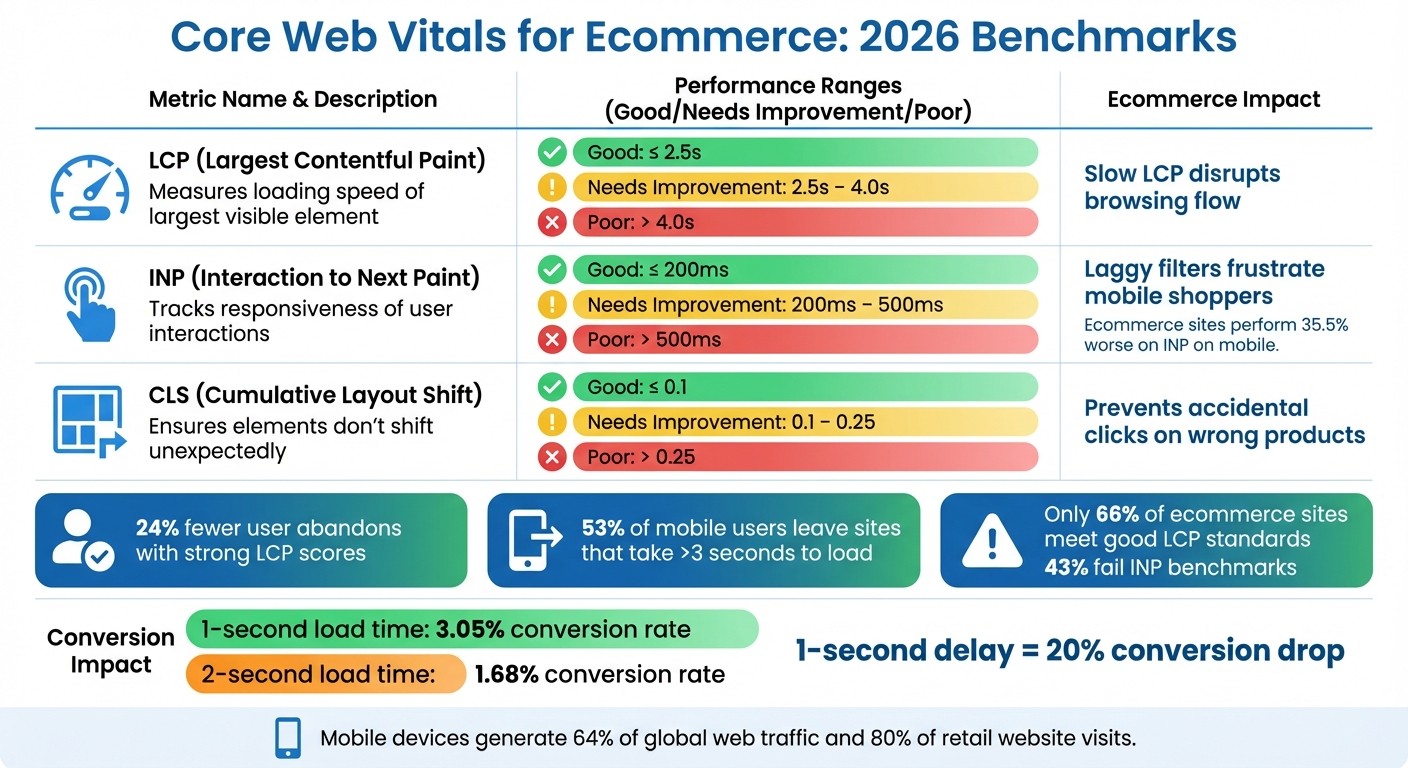
Ecommerce SEO 2026: Core Web Vitals Benchmarks and Impact
Google now prioritizes your site’s mobile version when determining rankings. That means issues like slow load times, hidden content, or clunky usability can hurt your position in search results [21]. Azra Kassam from Shopify sums it up perfectly:
"A flawless desktop site cannot compensate for weak mobile performance." - Azra Kassam, Shopify [21]
This shift makes sense when you consider the numbers. Mobile devices generate over 64% of global web traffic, with smartphones accounting for nearly 80% of retail website visits [21][23]. Even a one-second delay in load time can slash conversions by 20%, while improving load time by just 0.1 seconds can increase retail conversions by around 8% [21][24]. Despite this, only 66% of ecommerce sites meet good Largest Contentful Paint (LCP) standards, and 43% fail to hit the Interaction to Next Paint (INP) benchmark [24]. These poor scores don’t just frustrate users - they can also lead to ranking penalties from Google.
Core Web Vitals measure how well your site performs in real-world conditions. Largest Contentful Paint (LCP) tracks how quickly the largest visible element loads. Interaction to Next Paint (INP) measures the responsiveness of interactive elements like "Add to Cart" buttons. Cumulative Layout Shift (CLS) ensures that page elements don’t shift unexpectedly while loading. For example, in 2024, ecommerce platform Trendyol improved its mobile INP by 50%, reducing it from 963ms to 481ms, which increased click-through rates from product listings by 1% [24]. Similarly, Shopify store Carpe boosted its LCP by 52%, leading to a 5% rise in conversion rates and a 15% increase in revenue [24]. Ivy Boyter from FullThrottleSEO puts it bluntly:
"Core Web Vitals aren't vanity metrics. They're conversion insurance." - Ivy Boyter, FullThrottleSEO [5]
These metrics form the backbone of a strong mobile-first design strategy, which is explored further in the next sections.
Mobile-Friendly Ecommerce Templates
Designing with a mobile-first approach means starting with small screens and scaling up for desktop. Key elements like product names, prices, calls-to-action (CTAs), and trust badges should always appear above the fold [25]. Buttons and links need to be large enough - at least 48x48 pixels - with enough space around them to avoid accidental taps [3][21].
It’s also crucial that mobile content matches desktop content. Product descriptions, reviews, structured data, and internal links must be consistent across both versions. If content is hidden on mobile to save space, Google might not index it, weakening your SEO [21][1]. For category pages on screens under 768px, a two-column product grid strikes a good balance between image visibility and usability [6]. Adding a short 50–100 word intro above the grid and a longer 300–500 word editorial section below it can enhance both user experience and SEO [1][6].
Sticky elements can also boost conversions. For instance, a sticky "Add to Cart" button that stays visible as users scroll can increase add-to-cart rates by 15–25% [6]. On the other hand, intrusive pop-ups on small screens should be avoided as they disrupt the user experience and can negatively impact rankings [23].
Optimizing images is another must. Formats like WebP or AVIF can reduce file sizes by 25–35% compared to JPEGs [1][6]. Make sure to define width and height attributes for images to prevent layout shifts. For hero images, use the fetchpriority="high" attribute to avoid delays caused by lazy loading [22][24].
For ecommerce sites with large catalogs, server-side rendering (SSR) or static site generation (SSG) can improve First Contentful Paint times and ensure reliable indexing by Google’s mobile crawlers [22]. These strategies, combined with the mobile-first design principles, ensure your ecommerce site is optimized for both performance and conversions.
Core Web Vitals: Metrics to Monitor
Three metrics are critical for evaluating mobile performance in 2026:
LCP: Measures how quickly the largest visible element loads. Aim for ≤ 2.5 seconds.
INP: Tracks the responsiveness of user interactions like taps or clicks. A good score is ≤ 200 milliseconds. This metric will replace First Input Delay in March 2024.
CLS: Ensures that page elements don’t shift unexpectedly. A score of ≤ 0.1 is ideal [24][26].
Metric | Good (Pass) | Needs Improvement | Poor (Fail) | Ecommerce Impact |
|---|---|---|---|---|
LCP (Largest Contentful Paint) | ≤ 2.5s | 2.5s – 4.0s | > 4.0s | Slow LCP disrupts browsing flow [6] |
INP (Interaction to Next Paint) | ≤ 200ms | 200ms – 500ms | > 500ms | Laggy filters frustrate mobile shoppers [6] |
CLS (Cumulative Layout Shift) | ≤ 0.1 | 0.1 – 0.25 | > 0.25 | Prevents accidental clicks on wrong products [6] |
INP is particularly challenging for ecommerce sites. On mobile, sites perform 35.5% worse on INP compared to the older FID metric [24]. Heavy third-party JavaScript - like chat widgets or review plugins - often slows down interactivity. To combat this, audit your scripts, defer non-critical JavaScript, and consider offloading scripts to web workers using tools like Partytown [24][26].
To stabilize CLS, reserve space for promotional banners by setting explicit height attributes so they don’t push content down when they load [24]. Also, ensure body text has a minimum font size of 16px to avoid zooming issues that impair usability [26]. Testing on mid-range Android devices is essential, as these often reveal performance issues that high-end iPhones or desktop simulations miss [24][26].
Sites with strong LCP scores experience 24% fewer user abandons [26]. And since 53% of mobile users leave sites that take longer than three seconds to load, meeting these benchmarks is crucial [24]. Regularly check your Core Web Vitals through tools like Google Search Console and PageSpeed Insights to catch any performance problems before they impact your traffic.
AI-Driven Personalization in Templates
AI-powered personalization is now a key player in SEO, with search engines relying on behavioral metrics like return visits, session depth, and dwell time to evaluate content quality. By reducing bounce rates and keeping users engaged, personalized experiences send strong signals to search engines that the content is worth ranking higher [28]. As Robin Waite explains:
"Personalization is no longer a conversion trick: it's an SEO signal, now." - Robin Waite [28]
Shoppers referred by AI spend 32% more time on a site and view 10% more pages compared to those coming from traditional search [29]. Even more striking, ChatGPT referrals boast a 11.4% conversion rate, more than double the 5.3% rate of traditional organic traffic [29]. With 58% of consumers preferring generative AI tools to discover products, businesses must prioritize AI-driven discovery to stay relevant [27]. This shift ties into the 2026 SEO landscape, where technical optimization and user engagement go hand in hand.
Dynamic Content Personalization Using AI
AI takes static templates and turns them into dynamic, tailored experiences. For instance, category pages can automatically adapt by reordering products based on browsing history, highlighting items that fit specific needs, or tailoring content to a user’s location or past purchases [28]. Imagine a user searching for hiking backpacks - AI could prioritize options for "week-long trips" if that aligns with their intent [27].
To make your content AI-friendly, use clear, descriptive language that directly addresses who the product is for and the problems it solves. AI search engines rely on semantic retrieval to match user intent, so product descriptions should answer questions like "Best for [Use Case]" [27]. This approach makes it easier for AI assistants to extract and cite your content in conversational queries.
Several tools can streamline this process:
ConvertMate: Optimizes product descriptions at scale.
Orshot: Dynamically generates localized product images, such as changing backgrounds based on the user’s city.
Verbolia: Allows enterprise sites to create personalized "vPages" outside the main site structure, enabling large-scale personalization experiments without affecting site performance [32].
Balancing Personalization and SEO
While AI offers dynamic personalization, sticking to SEO basics is still essential. Ensure that details like price, availability, and product names are consistent across visible page content, JSON-LD schema markup, and your Google Merchant Center feed [27][29].
To avoid penalties for thin content, follow the 30% unique content rule: at least 30% of each page should feature unique, editorial text. Use short, personalized introductions (50–100 words) above the fold to engage users, followed by longer static sections (200–300 words) below the product grid to meet SEO requirements [1]. Pages with this balance of content rank 2.7x higher than those with only product grids [1].
Other best practices include:
Allowing all AI bots in your
robots.txtfile (e.g.,GPTBot,OAI-SearchBot,PerplexityBot).Using frameworks like SSR or ISR (e.g., Next.js) for fast, indexable personalized content [29][32].
Avoiding hidden content in accordions or images, as AI crawlers need visible HTML to process personalized details [33].
Feature | Traditional Ecommerce SEO | AI-Driven Template SEO |
|---|---|---|
Primary Target | Human Searchers / Google Crawler | Autonomous AI Agents / LLMs [30] |
Content Focus | Keyword-rich descriptions | High-fidelity structured data & context [30] |
Success Metric | SERP Rank / Click-Through Rate | Inclusion in AI Recommendations & Citations [30] |
Update Frequency | Weekly / Monthly | Real-time API & Product Feed Sync [30] |
User Experience | Static product grids | Dynamic, behavior-based personalization [28] |
Comparison: Traditional Ecommerce SEO vs. AI-Driven Template SEO
Lastly, make sure every page includes comprehensive Product schema markup. Incorporate elements like Product, Offer, AggregateRating, and the newer hasMerchantReturnPolicy schema. This structured data can boost organic click-through rates by an average of 30% [1] and enables AI agents to verify product details without human input [30]. Keep merchant feeds updated daily, as AI shopping tools ignore outdated information [31].
Fast-Loading Frameworks like Framer for SEO

Website speed has evolved from being just a user experience factor to a direct ranking signal for Google. In 2026, fast load times are critical, especially on mobile devices, which now account for 59% of all retail ecommerce sales [39]. This shift has pushed modern frameworks like Framer into the spotlight, offering solutions to the speed challenges that traditional platforms often face.
Framer, for instance, tackles performance issues that have plagued older platforms. While WordPress sites typically score 40-70 on PageSpeed and require 80-150 HTTP requests, Framer sites consistently achieve 85+ scores with just 20-40 requests [37]. This is possible because Framer uses a static-site architecture, which pre-renders pages and delivers them via global CDNs, bypassing the server delays that slow down traditional platforms [38][34]. As FramerWebExperts puts it:
"Google does not care whether the website was made using WordPress, Webflow, or Framer. It cares about quality + experience." [34]
These performance improvements directly enhance Core Web Vitals metrics like Largest Contentful Paint (LCP) and Cumulative Layout Shift (CLS), both of which are crucial for rankings in 2026 [34][25]. Framer's streamlined, semantic code also allows search engines to crawl and index pages more efficiently, while its zero-plugin architecture avoids the "bloat" that often hampers traditional CMS platforms [34][37].
Benefits of Framer for Ecommerce Websites
Framer's speed-focused design brings measurable advantages for ecommerce businesses. Faster load times don't just improve rankings - they also boost conversions. For example, websites that load in one second achieve a 3.05% conversion rate, compared to 1.68% for those that take two seconds [39]. This difference can determine whether an online store thrives or struggles.
Framer’s clean code and minimal JavaScript improve both user experience and crawl efficiency [34][25]. Unlike WordPress, which requires regular plugin updates and security patches, Framer automatically manages hosting, security, and performance optimization, saving businesses between $1,500 and $3,400 annually [37].
For brands prioritizing design, Framer offers pixel-level control without compromising technical SEO. This allows companies to craft unique brand identities that outperform standard Shopify themes while maintaining the fast load times Google values [38]. Framer’s integration with Shopify, through tools like Frameship ($89 one-time) or Framer Commerce (starting at $12/month), combines Framer’s speed-focused frontend with Shopify’s reliable backend for inventory management and payment processing [38][39].
To maximize performance, consider these tips:
Compress images into WebP or AVIF formats.
Use system fonts instead of external web fonts to reduce load times.
Manually add JSON-LD Product and FAQ schema to the
<head>tag for rich snippet eligibility.Hide empty CMS fields with conditional visibility to avoid "cookie-cutter" pages that send poor quality signals to search engines [34][35][36].
Migrating from Legacy Platforms to Framer
Switching from legacy platforms like WordPress or Squarespace to Framer can significantly enhance site speed and rankings. Although migration requires planning, the results are worth it. For example, in early 2026, Oma-kase migrated a 35-page marketing site with 120 blog posts from a custom WordPress Genesis theme (with 28 active plugins) to Framer. The mobile PageSpeed score improved from 52 to 91, load times dropped by 40%, and maintenance time decreased by 30% within six weeks [37].
Here’s how to ensure a smooth migration:
Create a comprehensive 301 redirect map to preserve rankings [37].
Use Screaming Frog to crawl your site and inventory all URLs, metadata, and internal links.
Map product data to Framer CMS collections, removing platform-specific shortcodes before importing via CSV [37][35].
Configure canonical URLs to point to your custom domain, avoiding indexing issues with Framer's default staging URLs [35].
Set up proper header hierarchies (H1-H6) and manually implement Schema markup for products and FAQs [34][35].
Publish 10-50 pages per day to let search engines evaluate content quality without triggering spam filters [35].
Optimize further by converting all product images to WebP format and enabling lazy loading for below-the-fold elements. These steps help maintain strong Core Web Vitals scores [3][25]. As Harish Malhi, Founder of Goodspeed, explains:
"Framer is not Shopify, and it is not trying to be... Framer lets you visually build custom headless storefronts and connect them to Shopify for product management." [38]
For ecommerce sites reliant on complex WordPress plugins, like membership systems or advanced WooCommerce logic, a hybrid setup may be necessary. However, for stores with curated catalogs of fewer than 200 products, the "Framer + Shopify" combination offers an excellent balance of design freedom and technical performance [38].
2026 Ecommerce Template SEO Checklist
Organic search accounts for 33% of all ecommerce traffic [1]. That means fine-tuning your ecommerce templates can be a game-changer, especially for small businesses. This checklist outlines the key areas to prioritize now and those to develop over time.
Quick Wins for Ecommerce SEO
Once your technical SEO foundation is in place, focus on these immediate adjustments to improve your ecommerce template performance:
Start by auditing your 50 top-revenue pages. Look for duplicate meta descriptions, thin content (fewer than 100 words), and missing structured data [1]. These pages are critical for driving revenue, so optimizing them first makes sense [5].
Update title tags to stay under 60 characters, using a format like "Product Name + Key Attribute + Brand" [4].
Add alt text to all product images and compress them to under 100KB using formats like WebP or AVIF [1].
Ensure every product template includes Product schema for price, availability, and ratings. This small adjustment can increase click-through rates by 30% [1]. Additionally, confirm your XML sitemap is current and that HTTPS is active across your entire site. For faceted navigation, use canonical tags to point to main category URLs [1].
For category pages, include 150–300 words of unique content either above or below the product grid. Google’s John Mueller emphasizes the importance of this:
"When the ecommerce category pages don't have any other content at all other than links to the products then it's really hard for us to rank those pages."
John Mueller, Google [40]
Category pages with unique content like this are shown to rank 2.7x higher than those that only display product grids [1].
Long-Term SEO Strategies
Once you've handled the quick fixes, incorporate these strategies to maintain and grow your SEO performance over time:
Develop a product hub model by linking relevant blog posts to category pages. This approach builds topical authority and passes valuable link equity [1].
Keep your site architecture shallow, ensuring any product is reachable within 3–4 clicks from the homepage [3].
For faceted navigation with many filter options, use a "noindex, follow" rule for URLs that don’t generate significant search traffic [1].
Track Core Web Vitals monthly and aim for these benchmarks:
LCP (Largest Contentful Paint): ≤2.5 seconds
INP (Interaction to Next Paint): ≤200 milliseconds
CLS (Cumulative Layout Shift): ≤0.1[6]
These metrics are critical not just for rankings but also for conversions. A 1-second delay in page load time can result in a 7% drop in conversions [4]. Keep out-of-stock product pages live to retain their SEO value [3][4], and only use 301 redirects for items that are permanently discontinued.
Lastly, update category guides and FAQ sections regularly. Adding FAQ schema can improve visibility in search results [4]. Following these steps ensures your ecommerce templates are ready to meet search engine standards and AI-driven search trends in 2026 [41][42].
Conclusion
Ecommerce SEO in 2026 demands a solid technical foundation. To stay competitive, your ecommerce site should focus on a shallow architecture, efficient faceted navigation, detailed schema markup, and mobile-first templates that load in under 2.5 seconds. Considering that organic search accounts for 33% of all ecommerce traffic [1], these optimizations directly influence your revenue. Every strategy highlighted earlier depends on getting these technical elements right.
Your product and category pages must be both technically accurate and rich in data to cater to AI assistants. Structured data plays a key role in ensuring AI can interpret your content effectively. Adding unique content to category pages can significantly improve rankings [1], while product schema has been shown to boost click-through rates [1]. These improvements aren’t just about visibility - they directly drive revenue. By combining technical accuracy with data-driven personalization, you can create templates that enhance both search performance and profitability.
"E-commerce SEO in 2026 is no longer about keywords and hope. It's about: Technical precision, Structured clarity, Authority concentration, Revenue prioritization."
Full Throttle SEO [5]
This quote perfectly sums up the integrated approach businesses need to adopt for future success. Companies that focus on template-level optimization today will enjoy stronger search visibility in the months to come. The leaders in 2026 will be those who treat SEO as a cohesive system - where technical structure, purposeful content, and conversion-focused design all work together [2].
Striking Alchemy, based in Pittsburgh, specializes in building high-performance ecommerce templates for platforms like BigCommerce and Framer. Whether you’re planning a site migration, need technical SEO upgrades, or want to scale your organic revenue, we’re here to help. Contact us for a free website audit and start applying these proven strategies to secure long-term search visibility and revenue growth.
FAQs
How do I stop faceted filters from creating too many URLs?
To keep faceted filters from creating too many URLs and leading to SEO problems, you can rely on a few key strategies: canonical tags, noindex directives, and URL parameter management.
Canonical tags: These help consolidate link equity by signaling search engines to treat the unfiltered category page as the primary version. This avoids splitting ranking power across multiple URLs.
Noindex directives: By applying these to duplicate or low-value pages, you ensure they won't appear in search engine results, reducing clutter in your indexed pages.
URL parameter management: Tools like Google Search Console allow you to control how search engines handle parameters, helping optimize crawl budgets and preventing unnecessary index bloat.
Together, these methods can help maintain a cleaner, more efficient site structure, boosting your site's SEO performance.
What schema fields matter most for product rich results in 2026?
By 2026, specific schema fields will play a crucial role in enabling product-rich results on search engines. These include:
name: The product's title or name.image: A visual representation of the product.description: A brief overview or details about the product.sku: The product's stock-keeping unit, used for inventory tracking.gtin13: The 13-digit Global Trade Item Number for identifying products.offers: This covers essential details like price, availability, and condition of the product.aggregateRating: Includes the overall rating value and the total number of reviews.
These fields help products stand out in search results by generating rich snippets that showcase important details like pricing, availability, and customer ratings.
How can I personalize pages without harming SEO or indexing?
To make ecommerce pages more personalized without compromising SEO or indexing, leverage AI-driven tools to customize content based on user behavior. At the same time, ensure that product descriptions, titles, and structured data remain consistent for search engines.
Prevent duplicate content issues by implementing canonical tags and using proper URL parameters. It's also critical to ensure that personalized content is rendered in a way that search engine crawlers can access. This can be achieved by using static HTML or server-side rendering, which ensures that no essential information is hidden or blocked from indexing.